

AI implementation services connect an AI capability to a business process and keep it tested, governed, and useful after launch. In McKinsey's 2025 survey, 88% of respondents said their organizations regularly used AI in at least one business function. 23% were scaling an agentic AI system in a function, while 39% were experimenting with AI agents (McKinsey's global AI survey).
Regular use is far more common than scaled agentic deployment. That difference makes workflow choice and ownership practical questions to settle before selecting a tool: define the problem, identify who will oversee the system, and decide whether AI fits the work. A sound decision may lead to a small pilot, or to no AI at all.
What AI Implementation Services Include
Buying an AI subscription gives your team access to a tool. Implementation is the work of making that tool part of a real process, with clear responsibilities, appropriate data access, a way to measure performance, and a plan for what happens after launch. Model selection matters, but it's only one decision in a longer chain.
McKinsey's findings show why those distinctions matter. Regular AI use across an organization doesn't mean the systems are integrated into dependable workflows. Moving beyond experimentation involves workflow design, connection to existing websites and content-management systems, measurement, governance, and staff adoption. These pieces depend on one another: a useful feature can still fail if it draws from outdated information, sits outside the software employees use, or has no owner to review its output.
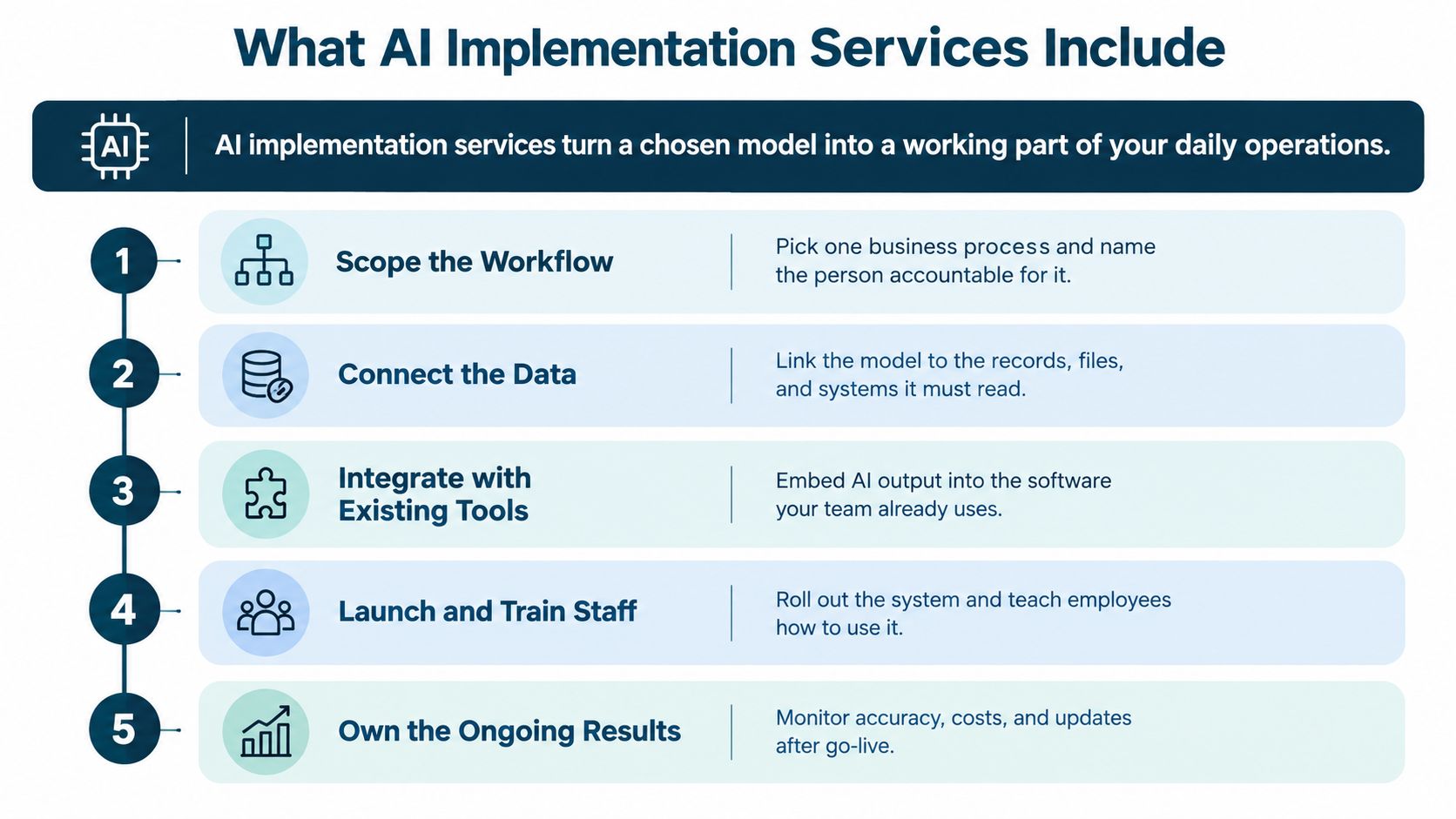
For a small organization, the scope might look like this:
- A support inbox: AI drafts replies, but staff approve them before they reach customers.
- A content team: AI helps research a topic, while an editor checks the facts and signs off on the final copy.
- A website search feature: AI answers questions using approved website pages, rather than drawing freely from unverified sources.
These are illustrations, not client stories. Each one needs a defined workflow, suitable data, a human review rule, and a way to tell whether the system is helping. Depending on the project, implementation can also involve integrating with analytics, cloud infrastructure, identity controls, and website tools.
A model purchase is a technology choice. A managed deployment is an operational decision. The difference is whether the system can do its assigned job reliably within the tools, rules, and responsibilities your organization already needs.
Deciding Whether AI Fits Your Business
The right AI implementation may be no implementation at all. Many small businesses do not need a custom chatbot or elaborate automation. Start by checking whether a process is repetitive, whether the necessary information is available, and whether AI could improve an outcome the business can measure.
A no-go can be good planning. If a task depends on personal judgment, happens infrequently, or lacks a clear owner, adding AI may create more work than it removes. Technical skill cannot make a poor-fit process worthwhile.
Use this applicability check before spending:
- Choose a repetitive, low-risk process. Look for work that happens often and follows recognizable rules. Avoid starting with consequential decisions that require personal judgment.
- Estimate the current cost. Account for staff time, delayed responses, missed leads, or another existing bottleneck. Record a baseline, such as lead-response time, support volume, publishing hours, or donation conversion rates.
- Check the data and permissions. Confirm the information exists in a usable form and that your organization has the right to use it for this purpose.
- Set the human review rule. Decide which outputs need approval, who will review them, and what happens when the system is uncertain.
- Agree on a stop/go threshold. Before spending, document what result would justify a pilot or continued use, and what result would end the project.
Practical rule: If nobody can name the process owner, the baseline, and the reason for changing the process, don't start with a build.
Your decision can be go, no-go, or pilot. A pilot is useful when the case looks promising but you still need to test the data, workflow, or review burden in practice. It is not a default step: if the process has no measurable problem or nobody can take responsibility for the outcome, stop there.
Browse these AI implementation examples to make a possible use case concrete. Then write down your own baseline and decision threshold. The small-business AI adoption findings can provide context, but your decision should rest on your workflow, available data, and capacity to own the result.
How the Integration Process Moves from Scope to Launch
An integration should earn its way into production. A convincing demo is not enough: the workflow must fit the business, connect to authorized data, and give staff a practical way to review exceptions. If those conditions do not hold, pausing or stopping is a sound result.
MIT NANDA's 2025 report describes a gap between organizations exploring AI and those putting it into production. The figures cited for that gap have not been established here, so the useful takeaway is qualitative: moving from interest to a working system takes more than choosing a model. Keep the scope narrow, test the real workflow, and make each next step depend on evidence. MIT NANDA's State of AI in Business report
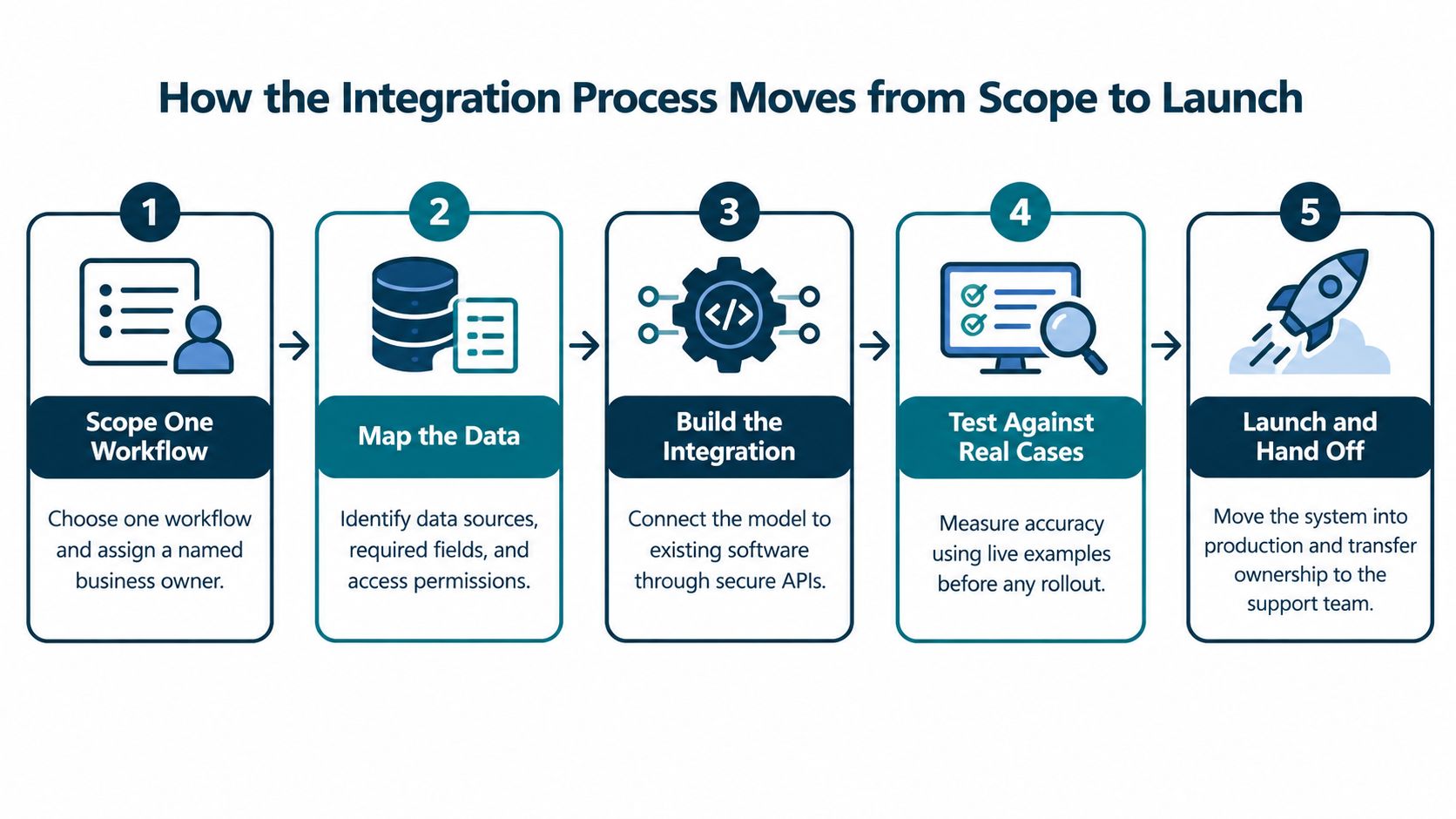
Use a gate at every stage
- Scope one workflow. Name the business owner and specify what the system will and will not do. Proceed only when the intended outcome is clear enough to assess.
- Map the data. Identify the records, files, permissions, and systems the feature needs. Confirm the information is available and authorized for this use.
- Build the connection. Link the AI to the relevant tools, such as a content-management system, analytics platform, or contact form. Check that information moves as required and unrelated data stays out of the workflow.
- Test representative cases. Use examples that reflect routine requests and likely edge cases. Set review criteria for first-pass accuracy, escalation rate, staff review time, and cost per transaction.
- Run a limited pilot, then decide. Let a defined group use the workflow. Review results and check whether staff can manage exceptions. Proceed to production only if the agreed criteria are met and someone is prepared to support the live system. Otherwise, revise the pilot or stop.
The difficult work is often fitting the connection to the organization's actual tools and process, not selecting a model. The AI agent integration guide outlines integration considerations; the right setup still depends on your systems and data. For app-specific decisions, this guide to how to integrate AI into an app can help clarify what the connection requires.
Setting Data Rules Before Anything Goes Live
An organization doesn't need to launch an AI product for data risks to appear. Staff may already be using outside tools without formal oversight, a practice often called shadow AI. Banning those tools without offering an approved route for legitimate work can push use out of sight rather than making it safer.
IBM's 2025 Cost of a Data Breach research found that 20% of surveyed organizations reported a breach involving shadow AI, while just 37% had policies to manage AI or detect shadow AI (IBM's Cost of a Data Breach research). For a small organization, the practical response isn't a sprawling compliance manual. It's a short set of rules people can follow.
Write down four things:
- Approved tools: Name which AI tools staff may use for work.
- Restricted data: List what must never be entered into an external model, such as sensitive customer, donor, or internal business information.
- Access and logging: Decide who can use connected systems and how the organization records important activity.
- Approval responsibility: Name one person who reviews requests for new tools or use cases.
The NIST AI Risk Management Framework offers a useful structure without requiring a small team to become compliance specialists. Its four functions are Govern, Map, Measure, and Manage: set accountability, document the intended use and risks, test the system, then apply controls to the risks that remain (NIST's AI Risk Management Framework Playbook). That sequence makes the rules easier to revisit as a use case changes.
If your business serves people in Europe, classify the use case before deployment and check whether it falls under the EU AI Act's requirements. The Act follows a phased schedule, and requirements differ by use case (European Commission guidance on AI Act enforcement). For practical groundwork, Bruce & Eddy's overview of database security best practices is also relevant to decisions about data access and handling.
Who Owns the System After Launch
A launch does not transfer responsibility to the software. Someone on the team still needs to check its outputs, account for ongoing costs, and decide whether it belongs in the workflow. Without a clear owner, staff may keep relying on answers after the system or the business process has changed.
For nonprofits, Google's 2025 survey points to practical reasons to assign that responsibility: 60% of respondents viewed familiarity with generative AI as the top adoption barrier, 50% struggled to identify suitable tools, and 55% cited funding limitations (Google's 2025 nonprofit survey results). These findings connect adoption to day-to-day ownership: staff need support using the tool, and someone must judge whether it remains affordable and appropriate. A tool can be available and still fail if the organization cannot support it.

Give one person a clear operating checklist
- Named owner: Assign someone to oversee routine operation and decide when changes need review.
- Approved uses: Keep a short list of tasks the system can perform, with clear limits.
- Human review: State which outputs need approval and who handles uncertain or sensitive cases.
- Quality checks: Have the owner sample outputs for accuracy and tone. Record incidents so recurring problems do not disappear into private messages.
- Cost review: Check whether the ongoing expense still makes sense for the workflow.
- Retraining trigger: Review the system when its process, source content, or relevant policy changes.
Set access and retention according to the information each use case needs. Donor records, member information, volunteer details, and customer data may require different treatment, so avoid applying one broad rule to every category.
Consider an AI-drafted support reply that continues citing an old policy after the business changes its terms. Routine sampling gives the owner a chance to catch the error, pause the feature, and review its source material before staff rely on it again. Ownership will not prevent every mistake. It does make response and follow-up someone's responsibility. Businesses that need help maintaining the underlying systems can review Bruce & Eddy's IT support services.
Comparing Provider Models and What to Ask
There's no single provider model that suits every organization. A business with one narrow task may only need a platform feature or a focused freelancer. A project involving the website, data connections, and ongoing support may require a partner that can work across those systems.
| Provider Model | Best Fit | Main Tradeoff | Ownership After Launch |
|---|---|---|---|
| In-house hire | An organization with enough ongoing AI work to justify a dedicated internal role | The hire brings focus, but the business carries the recruiting and management responsibility | Internal, if the role includes ongoing support |
| Freelance specialist | A contained project with a clear scope and an internal person ready to take over | Specialized help can be a good fit, but availability and handoff arrangements matter | Usually transfers to the client unless ongoing support is agreed |
| Full-service web and digital operations partner | A business whose AI work touches its website, CMS, analytics, hosting, or maintenance | Broader support may be unnecessary for a single, isolated task | Can be shared or ongoing, depending on the agreement |
| AI features included in an existing platform | A team testing a low-complexity use case inside software it already uses | Convenient to try, but the feature may offer limited control over its data flow and behavior | Often depends on the platform's support and the organization's internal owner |
Bruce & Eddy is a Texas-based web development and digital operations partner, founded in 2004 and serving clients nationwide. Its work brings together in-house designers, developers, and marketing specialists with on-demand AI implementation experts, connecting AI projects to the websites, CMS, analytics, hosting, security, and maintenance clients already rely on. That kind of combined support may suit a project with connected website and operations needs, but it's more than a narrow task may require.
Ask any provider how they scope the first workflow and test outputs before release. Find out who monitors the system afterward, how data is stored and whether it's used to train outside models, and what happens if the organization needs to turn the system off. If the provider can't explain those responsibilities clearly, the proposal isn't ready for approval.
Where to Start Your Own Implementation Plan
Start with one page describing a single workflow. Name the owner, record the current baseline, list the data involved, define the human review rule, and set the threshold that would stop the project. That document is useful whether you build internally, hire a freelancer, or ask for outside help.
Writing it often reveals whether the idea is ready for a pilot or whether a process, data, or ownership problem needs attention first. If you'd like a second opinion once the scope is clear, contact Bruce & Eddy to discuss the decision. A useful conversation can end with a no-go.
Bruce & Eddy works on website development, integrations, and AI implementation connected to the digital systems a business already uses. If your one-page scope is ready for an outside review, visit Bruce and Eddy to discuss whether a pilot, a different approach, or no deployment is the right next step.
