

Stop shopping for AI tools. That's the most popular advice you'll hear, pick a platform, run a pilot, watch productivity climb, and it's backwards for most small organizations. A solid AI implementation strategy starts with a harder question. Which workflow, owned by which person, should produce which measurable result, and what happens when the output is wrong? If you can't answer that in plain language, you don't have a strategy. You have a subscription.
Why Most AI Adoption Stalls Before It Pays Off
Adoption is not the same as payoff, and the numbers make that uncomfortable point clearly. In McKinsey's 2024 global survey on AI adoption and EBIT impact, 78% of respondents said their organizations used AI in at least one business function, up from 72% in early 2024 and 55% one year earlier. Generative AI followed the same pattern, with 71% reporting regular use compared with 65% in early 2024. Yet more than 80% said their organizations had not yet seen a tangible impact on enterprise-level EBIT.

That gap isn't mysterious. A demo proves a model can produce something plausible. An operational capability proves a team can produce a better business outcome, repeatedly, under real constraints. Those are different jobs, and most stalled projects never made the jump from the first to the second.
What separates a demo from an operating system
A demo has no owner after the meeting ends. Nobody redesigned the workflow around it, nobody defined what a good output looks like, and nobody's measured whether conversion rates, response time, cost per transaction, or operating margin moved. The tool sits there, technically available, practically optional.
An operating capability looks boring by comparison, which is a compliment. It has a named owner, a baseline, a review step, and a reason to exist that a bookkeeper would understand.
Practical rule: If you can't state the metric, the owner, and the baseline in one sentence, you're not ready to buy anything.
For small and midsize organizations, the staged path works better than a broad rollout. Start with narrow, low risk work like assisted content production, customer service drafts, analytics summaries, or internal knowledge search. Keep the investment small while you gather evidence, and look at practical AI implementation examples for small organizations to see how narrow those starting points can be. Adoption statistics tell you what other people bought. They don't tell you whether it paid.
Running a Relevance Audit Before You Buy Anything
Most guidance assumes you've already decided AI belongs in your business and you just need help picking tools. For a lot of small teams, that's skipping the actual first question. Where could AI create measurable value without adding complexity you can't maintain?
That skepticism is more common than vendors admit. U.S. Small Business Administration research cited in Capgemini's generative AI in organizations research found that nearly 82% of businesses with fewer than five employees that did not plan to adopt AI believed AI was not applicable to their business. Only 6.7% cited lack of knowledge and 6.3% cited privacy concerns. The barrier isn't mostly education. It's relevance, and that's testable.
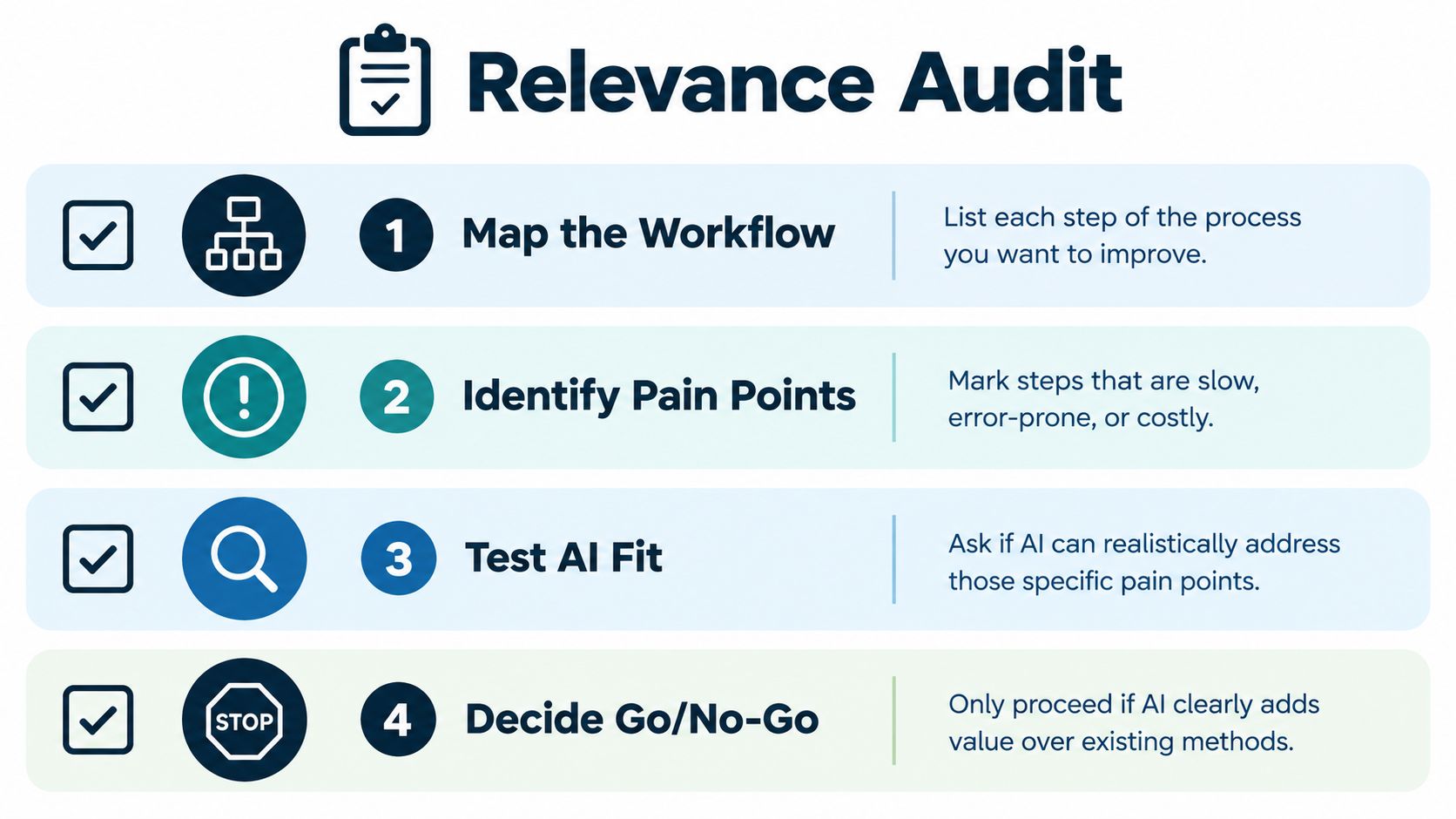
The one afternoon audit
You don't need a consultant or a workshop series for this. You need a list of your recurring work and the discipline to score it fairly.
- Map repetitive work: List tasks that are high volume, error prone, or slow, like triaging website inquiries, drafting routine communications, summarizing customer or donor feedback, or finding SEO content gaps.
- Attach a metric to each one: Every candidate task gets a number you already care about, such as hours saved per case, publishing cycle time, answer accuracy, or qualified lead conversion.
- Check the inputs: Ask whether the data feeding that task is consistent enough to use, or whether a human would spend more time cleaning it than doing the task manually.
- Price the oversight: Estimate setup time plus ongoing review time. AI output that needs constant correction isn't saving labor, it's relocating it.
The stop go rule most content skips
Here's the part almost nobody will tell you because it doesn't sell software. Not implementing AI may be rational. If task volume is low, data is poor, or the expected benefit can't exceed setup and oversight costs, the correct move is to stop. Write down why, revisit it in six months, and spend the money somewhere with a clearer return.
If a task passes, it should pass narrowly. One workflow, one metric, one owner, human approval intact. That's the unit your whole AI implementation strategy gets built from.
Getting Your Data and Integration Foundations Ready
Before any tool touches your website, CRM, help desk, or inbox, you need to know what it's touching. Most integration problems aren't model problems. They're inventory problems that nobody wanted to do on a Tuesday afternoon.
Start with where the data lives. For a typical small organization, that's a website database, a CRM, shared documents, email, an analytics platform, and probably a spreadsheet someone swears is temporary. Document the sources, formats, retention rules, and sensitive fields in each one before you connect anything.
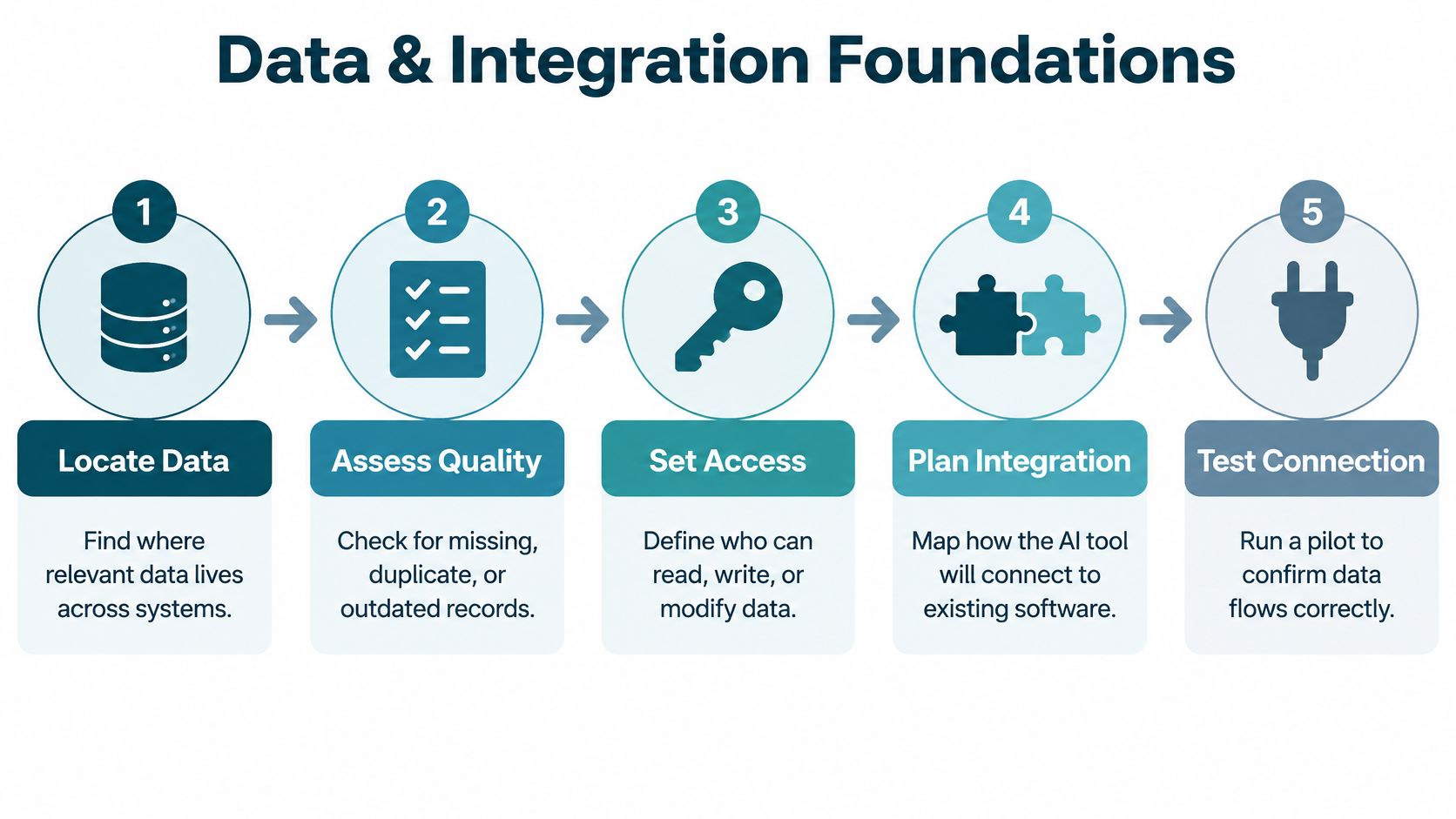
A readiness checklist a small team can finish
- Locate and classify: Name every source the AI will read from, and flag personal, financial, or donor information that needs redaction or exclusion.
- Set access deliberately: Give the tool the minimum permissions it needs. Read access to approved documents is a very different risk than write access to customer records.
- Separate environments: Keep test and production apart so experiments never run against live client data.
- Plan the connection points: Map how the tool links to your CMS, CRM, and analytics, a job that overlaps heavily with cloud services integration planning work.
The video below walks through how data preparation and connection testing fit together before a pilot goes live.
One risk deserves specific attention once a model connects to real systems. Prompt injection happens when crafted input manipulates an AI system into ignoring its intended instructions, a failure mode OWASP documents for large language model applications with possible consequences including unauthorized access and data breaches. Adding a line to your system prompt won't fix that. Separating what the model can read from what it can do, logging tool calls, and requiring confirmation before consequential actions will get you much further.
Choosing Between Build, Buy, and Bundled AI
Once a workflow passes the relevance audit, you have three realistic paths. Most small teams should start with the least interesting one, which is usually the AI features already bundled into software they pay for.
Bundled features in your CMS, help desk, email platform, or analytics tool won't win any demos. But they come with existing permissions, existing billing, and existing support, and your team already knows where the buttons are. That's worth more than a marginal quality difference in generated text.
Build vs Buy vs Bundled AI for Small Teams
| Criterion | Build on API | Buy Standalone Tool | Use Bundled Features |
|---|---|---|---|
| Time to first value | Slowest, needs development and testing | Fast, if onboarding is honest | Fastest, already in your stack |
| Cost structure | Usage based cost per transaction plus maintenance | Subscription per seat or per volume | Often included or a small add on |
| Data control | Highest, you set retention and routing | Depends entirely on vendor terms | Follows your existing platform terms |
| Custom workflow fit | Best fit for unusual processes | Moderate, within the vendor's model | Limited to what the platform offers |
| Ongoing burden | You own updates, monitoring, and fixes | Vendor maintains, you administer | Lowest, platform handles it |
| Vendor lock in | Lower if you build clean abstractions | Higher, your data and habits accumulate there | Tied to a platform you already use |
How to actually decide
Build only when the workflow is specific to your organization and the volume justifies maintaining it. Building a custom intake summarizer that plugs into your exact approval process can make sense. Building your own general chatbot almost never does.
Buy standalone when a specialized tool clearly beats bundled options on a metric you defined in the audit, not on feature count. Before you commit, work through a comparison of AI tools for small business use and test finalists against your own real examples, not the vendor's samples.
Whichever path you pick, write down the exit plan. Can you export your data? What breaks if pricing changes? A tool you can't leave is a dependency, not a solution.
Designing Governance With NIST Govern Map Measure Manage
Governance sounds like enterprise paperwork until an AI tool sends a wrong answer to a customer or pastes sensitive information into the wrong place. Then it sounds like the thing you wish you'd written down earlier.
The U.S. National Institute of Standards and Technology released its voluntary AI Risk Management Framework on January 26, 2023 after a consensus driven public process. The framework is voluntary, rights preserving, non sector specific, and use case agnostic, which makes it usable for a small business, church, or nonprofit without a compliance department. It organizes the work into four functions that translate cleanly into operating habits.
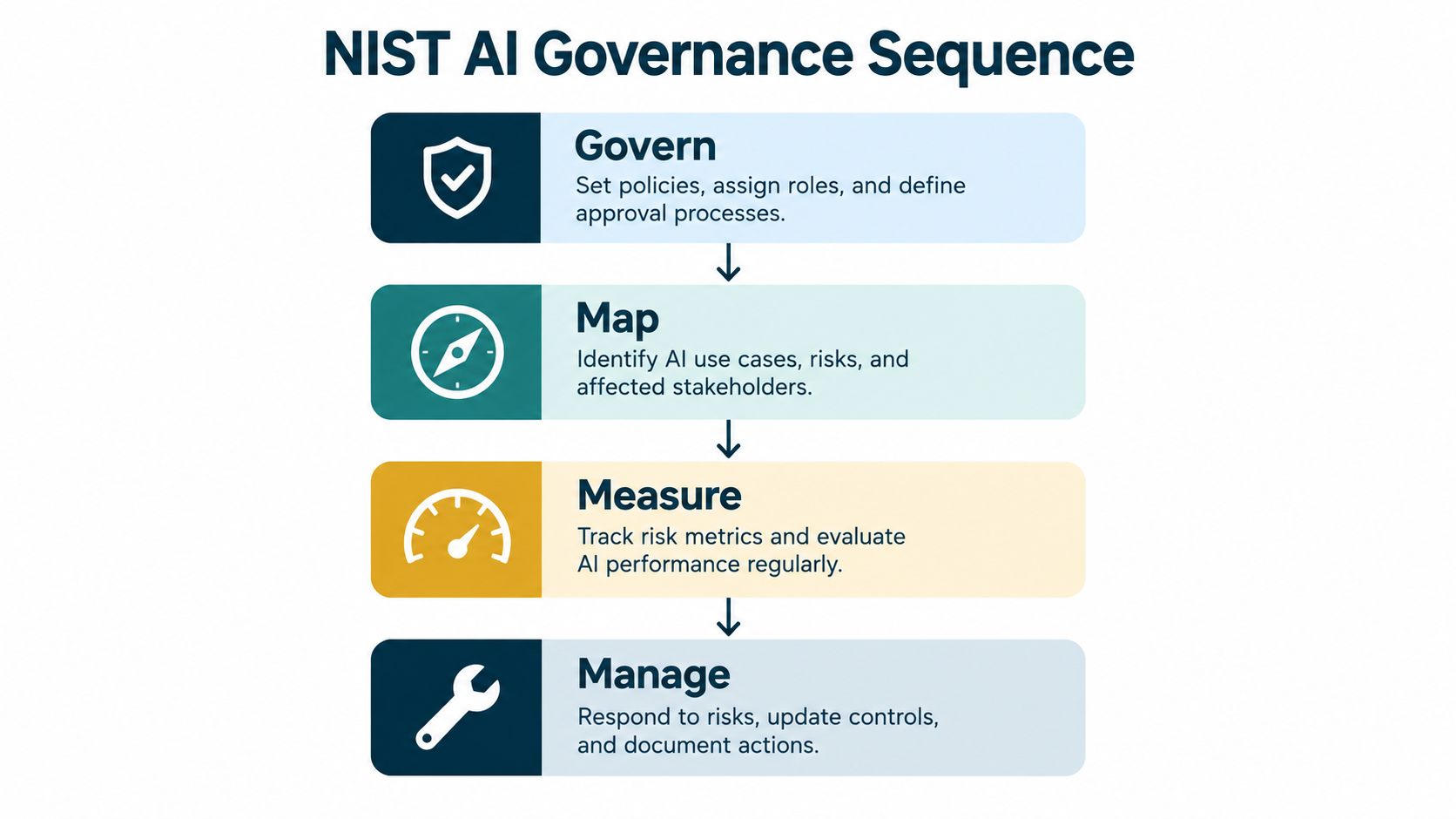
The four functions as working artifacts
Govern means documented policies, named roles, and approval thresholds, meaning who can approve AI assisted content, customer messages, or anything consequential. Map means writing down intended users, data flows, failure modes, and who's affected when it goes wrong. These two steps produce short documents, not binders.
Measure is where most small teams underinvest. Before launch, build a versioned evaluation set with normal, edge case, adversarial, and domain specific examples, and track grounded answer rate, hallucination rate, latency, cost per transaction, and human override frequency. NIST's guidance in the AI Risk Management Framework publication on measuring and managing risk recommends selecting metrics for the most significant risks and regularly reassessing whether those metrics still fit.
Manage covers what happens after measurement, including controls, escalation paths, rollback triggers, and periodic reassessment. Pair that thinking with your existing data security solutions and access controls so AI governance doesn't become a separate, ignored system. Small teams comparing notes will also find research for small teams useful context on how peers are handling these same approval and oversight questions.
Governance is a loop, not a launch checklist. The work repeats every time the model, the data, or the use case changes.
Timing matters too, especially if you serve European users. According to the EU AI Act implementation timeline from the European Commission, the Act entered into force on August 1, 2024, with AI literacy requirements and prohibited practices applying from February 2, 2025 and further milestones scheduled through August 2, 2028. You don't need to wait for a deadline to inventory your tools and assign an owner to each one.
Operational Change Management Roles and Approvals
The hardest part of implementation isn't the API. It's deciding who owns the output on a normal Wednesday when the person who championed the project is on vacation.
The data supports treating this as the main event. A 2025 global survey referenced in KPMG's generative AI survey report found that 93% of large organizations were exploring or enabling generative AI, yet only 13% had scaled it across the enterprise and just 8% had embedded it into corporate strategy. In a separate 2025 board survey from the same research, 47% identified new skills and talent as a major deployment disruption and 42% cited workforce transformation. Small business respondents reported a practical version of the same problem, with 38% concerned about data privacy and security, 37% lacking time or resources to explore AI properly, and 34% lacking a clear use case or ROI.
Roles that need names attached
Every AI assisted workflow needs four assignments, and in a small team one person may hold several of them. That's fine, as long as it's explicit.
- Workflow owner: Accountable for whether the process still produces the defined business outcome.
- Output reviewer: Checks accuracy before anything reaches a customer, donor, or congregation member.
- Data steward: Decides what information may enter external tools and what must be redacted first.
- Escalation contact: Receives error reports and can pause the tool without a meeting.
Approval thresholds should match consequences. Internal summaries can move fast. Published web copy, financial figures, pastoral or donor communications, and anything resembling advice need a human signature. Write those thresholds down where new staff will readily find them.
Training follows from the roles, not from a generic AI awareness session. Reviewers need practice spotting confident but wrong output. Everyone needs the data handling rules in plain language. And when productivity gains show up, decide in advance where that time goes, whether that's faster response times, better content, or fewer weekend hours. Gains nobody reassigns tend to evaporate into more low value work.
Pilot Metrics and the 30 60 90 Review Rhythm
Pilot purgatory is where good intentions go to bill monthly. A pilot without a decision date is just a slower way of buying something permanently.
The funnel is brutal, and it's useful to know that going in. The MIT NANDA 2025 analysis summarized alongside McKinsey's State of AI 2025 findings found that roughly 60% of organizations evaluated general purpose AI tools, about 20% reached pilot stage, and only 5% reached production. The same dataset reported that top performing organizations moved from pilot to full implementation in approximately 90 days, compared with nine months or longer for typical enterprises. Speed came from narrow scope and clear gates, not bigger budgets.
A review rhythm that forces a decision
- 30 days, technical acceptance: Does it meet your evaluation set thresholds for accuracy, latency, and refusal quality? Are audit logs and escalation paths working?
- 60 days, business outcome: Compare results against the pre specified baseline, using hours saved per case, qualified lead conversion, publishing cycle time, escalation rate, or incremental gross margin.
- 90 days, scale restrict or stop: Expand only with sustained operational and financial impact. Restrict the use case if value is real but narrow. Stop if neither shows up.
Don't confuse enthusiasm with return. The same McKinsey research noted that 88% of respondents used AI in at least one business function while only 39% reported any enterprise level EBIT impact, and most of those reported less than 5% of EBIT attributable to AI. Usage is easy to measure and nearly meaningless. Outcomes are harder and they're the whole point.
Questions small teams ask most
What if the pilot works but staff don't trust it? That's a workflow design problem, not a morale problem. Tighten the review step, show reviewers the evaluation results, and keep the human override visible and easy.
What triggers a rollback? Any breach of your set thresholds on accuracy, hallucination rate, or cost per transaction, plus any incident involving sensitive data. Decide those triggers before launch, not during the apology.
How big should the first pilot be? One workflow, one team, one metric. Your AI implementation strategy earns the right to expand by passing gates, not by starting big.
If you're weighing where AI fits into your website, support workflow, or content operations, we can help you run the relevance audit, clean up the data foundations, and build a pilot with real decision gates. Visit Bruce and Eddy to talk through your situation with a team that would rather tell you to skip a tool than sell you one you don't need.
