

The usual advice about CRM integration services starts with choosing a connector. I'd start with the records you don't trust, the person who'll handle a failed sync, and the maintenance budget. Connecting applications is useful work, but it won't fix unclear ownership or turn inconsistent customer information into reliable reports.
A good integration should make a specific business task easier without creating an unattended system your team can't support. Before signing a proposal, you should know what moves, which application controls it, what happens when delivery fails, and how you can leave the arrangement later.
What CRM Integration Services Actually Connect
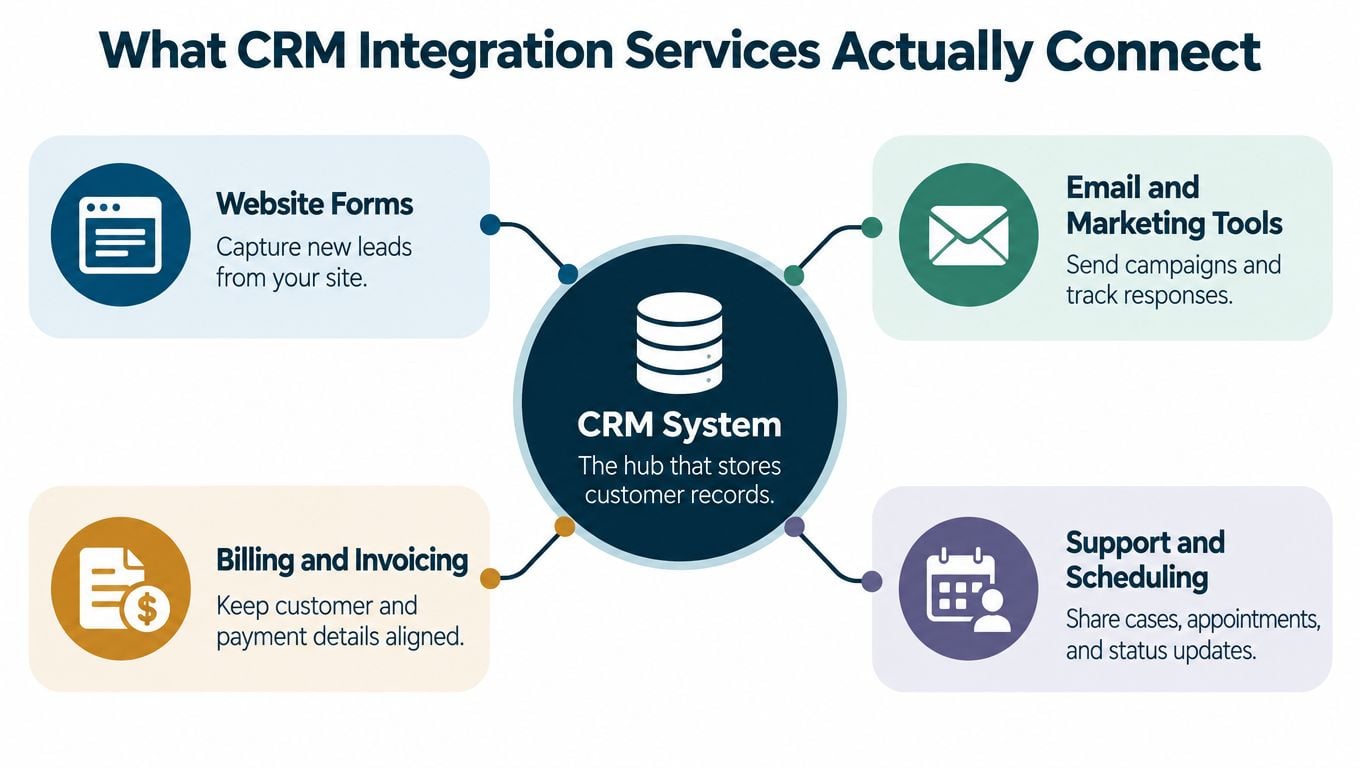
CRM integration services connect a customer relationship management system to the other tools your business already runs, including website forms, email marketing, accounting, scheduling, donation platforms, and support desks. The aim is to associate activity with the right customer record instead of leaving staff to assemble the history themselves.
Say a service business receives a website inquiry, schedules an appointment, and sends an invoice. Without connected systems, someone copies the inquiry into the CRM, the appointment stays in a calendar, and payment information remains in accounting.
The connection map looks like this:
Adoption isn't the same as connection
European enterprise figures summarized by SHNO's CRM statistics compilation put CRM adoption in 2025 at 24.69% among small enterprises, compared with 65.43% among large enterprises. Separately, a 2025 survey cited in Cyntexa's CRM statistics overview found that only 32% of organizations had a single, unified view of customer information, although 90% believed one would be valuable.
For a growing team, the useful outcomes are straightforward:
- Fewer duplicates: Existing customers don't become new contacts every time they submit a form.
- Shared customer history: Sales and support can see relevant activity without requesting an inbox search.
- Trustworthy reporting: Reports use consistent definitions for sources, stages, and outcomes.
For outbound sales, CapyScout's guidance on integrating prospecting tools with your CRM is a useful starting point for examining that particular handoff. If your starting point is the website, understanding how CMS integration connects website systems helps separate content-management work from customer-record work.
Neither connection should begin until you've decided which records and fields deserve to travel.
Clean Your Data Before You Connect Anything
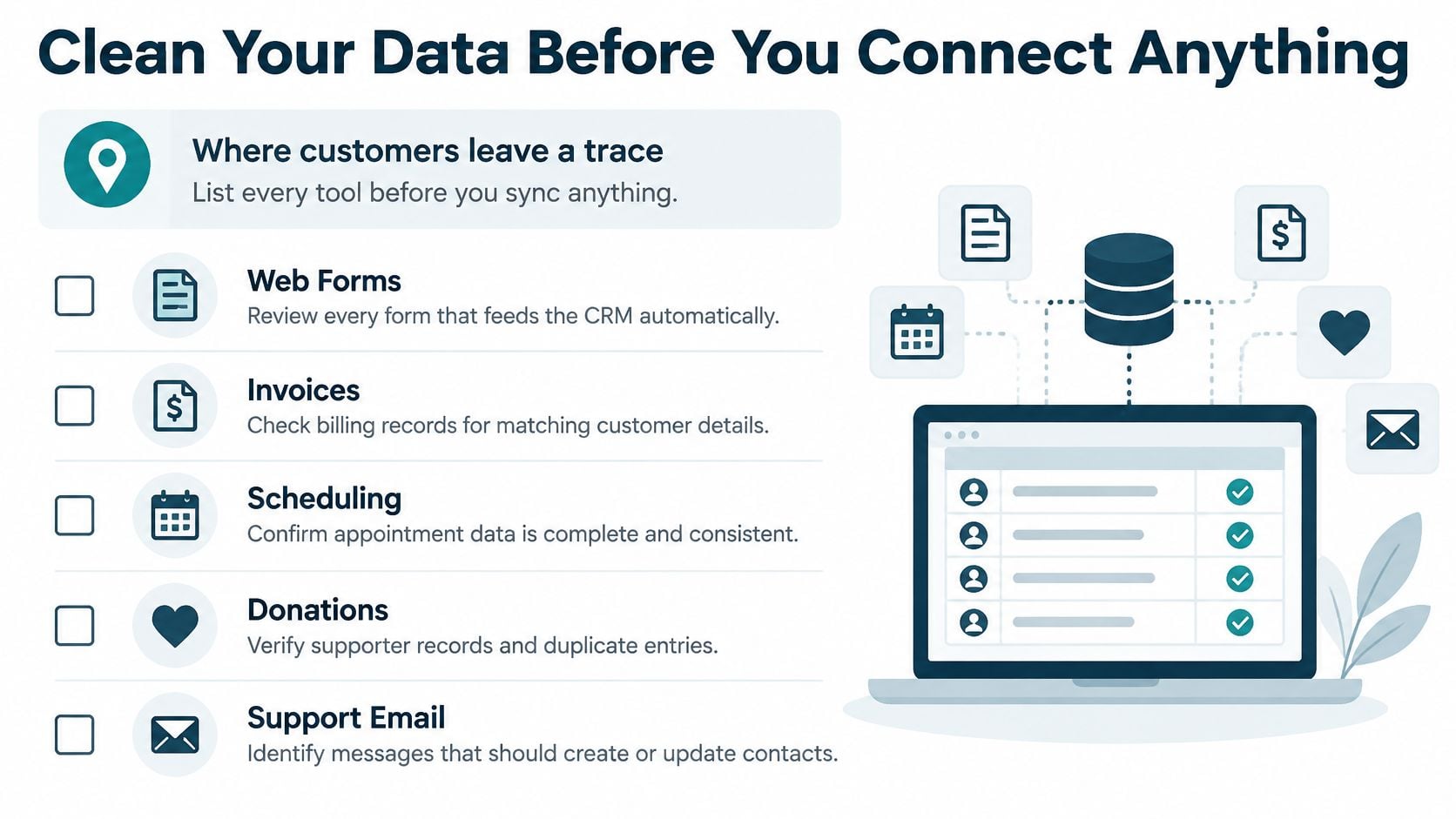
Start with scope, not cleanup software. List every place a customer leaves a trace: website forms, invoices, appointment calendars, donations, support email, spreadsheets, and marketing lists.
Beside each tool, record whether information enters the CRM automatically, gets typed in manually, or never arrives. Include who uses the tool and what they believe its fields mean.
Use this checklist to find the systems that need attention:
Audit the records before migration
A 2025 survey of 602 CRM users and administrators in the United States, United Kingdom, and Australia, described in Hypha Development's implementation-budget analysis, found that 76% said less than half of their organization's CRM data was accurate and complete. That's a strong reason to inspect the records before automating their distribution.
Resolve duplicate contacts. Compare normalized email addresses and phone numbers, then review ambiguous matches manually. Choose the surviving record and preserve useful activity rather than deleting duplicates indiscriminately.
Standardize shared fields. Set formats for phone numbers, state names, dates, and lead sources. A controlled dropdown beats several spellings of the same campaign.
Check communication permissions. Preserve consent status, its origin, and supporting timestamps where available. A contact's presence in your database isn't permission to add them to every communication channel.
Assign field ownership. Identify the authoritative application and a responsible person for each shared field. Accounting might control billing status while the CRM controls sales stage.
Classify inactive records. Mark them for migration, archive, or deletion after checking applicable retention obligations. Inactivity alone doesn't establish that deletion is appropriate.
Choose which history stays behind. Keep an access-controlled, auditable archive when old activity has reference value but no operational purpose in the new system. Document where it lives and how authorized staff retrieve it.
For churches and nonprofits, ask the people maintaining donor, member, and volunteer spreadsheets to explain their columns. A field labeled status might describe membership, giving participation, or whether someone answered an email.
Define what clean enough means
You don't need perfect historical records to launch. You do need reliable matching fields, understood permissions, and complete information for the workflow you're enabling.
Track duplicate rate, required-field completion, and the share of eligible records updated automatically, then review those measures monthly. Record the baseline before cleanup so you can tell whether staff are correcting fewer exceptions after launch.
Practical rule: A narrower integration with trustworthy records is a better starting point than a broad integration that spreads uncertain information.
Keep the scope map beside the audit while working through the supporting video:
Integration Approaches Compared by Cost, Control and Upkeep
Use this comparison to match the implementation route to the people who'll maintain it, not just the setup quote.
Integration approaches by cost, control and upkeep
| Approach | Best fit | Lock-in | Rate-limit exposure | Ongoing upkeep |
|---|---|---|---|---|
| Native connector | One CRM linked to one tool with standard fields | Low to moderate | Set by the CRM and usually handled by the vendor | Low, updated by the vendor |
| Middleware platform | Several tools with simple flows that non-developers can edit | Moderate, flows live on the platform | Shared with the platform's plan limits | Moderate, flows need review when fields change |
| Custom API build | Legacy systems, unusual business rules or AI-powered workflows | Low if you own the code | Designed by the builder, so retry logic must be included | High, code, logs and API changes need a named owner |
| Managed integration service | Organizations that want outcomes without an internal IT team | Set by the contract | Handled and monitored by the provider | Recurring retainer, scope set in the agreement |
Start with the least complicated suitable route
A native connector is worth testing first when the workflow uses ordinary contacts, companies, and standard fields. Check its actual behavior, though: whether it creates or updates records, handles deletions, preserves preferences, and exposes failed transfers. Vendor-managed updates reduce your maintenance work, but unsupported fields may force a workaround.
A middleware platform gives staff a visual place to connect triggers, filters, and actions. It's useful when someone on the team can understand the flow and review changes without writing application code.
The trade-off is portability. Moving away means recreating those flows elsewhere, and every extra action may count against platform allowances. A visual workflow still needs testing, credentials management, and an owner.
Pay for control only when it solves a real constraint
A custom API build makes sense when existing connectors can't express an important business rule or reach a legacy system. Code ownership reduces one kind of lock-in, but you also need deployment instructions, account access, and documentation that another developer can use.
Bruce & Eddy's Custom Web Development work covers businesses upgrading legacy systems, launching products or platforms, adding AI-powered integrations, handling complex multi-site needs, or rebuilding after years of patchwork. Our custom CRM development services are relevant when the customer workflow itself requires that additional control, not because custom sounds more capable.
A managed integration service changes who carries the operational burden. It can be sensible when your team has no capacity to manage technical failures, but the agreement must distinguish monitoring, repairs, enhancements, and third-party subscription charges.
The cheapest build isn't the cheapest arrangement if the business owner becomes its unpaid support desk.
Pick the route your actual team can sustain. Don't commission custom software to avoid a reasonable subscription, and don't keep stretching a connector after its workarounds become harder to understand than purpose-built code.
How Data Moves Between Your CRM and Other Tools
The connector is usually the easy choice. The harder work is deciding which system owns each field, what happens when records disagree, and who maintains the connection after launch. REST APIs, webhooks, bulk jobs, and GraphQL each move data differently, so match the method to the job and the limits of the systems involved.
REST APIs provide operations for reading and writing resources such as contacts, invoices, and companies. They're relatively straightforward to inspect and debug. However, making a separate request for every record or related object can slow imports and add unnecessary work.
Webhooks notify another system when something changes, such as a form submission or updated appointment. They suit time-sensitive handoffs. The receiving system still needs to verify the sender and safely record each event before processing it.
Scheduled bulk jobs transfer groups of changes through batch or bulk endpoints. They work well for recurring transfers that don't need to happen immediately. GraphQL serves a different purpose, letting an application request selected fields from related objects for a dashboard, portal, or mobile screen.
Match the mechanism to the task
A simulated CRM study published through ISCSITR, using approximately 10,000 records, found that retrieving nested customer, order, and invoice data averaged 920 KB through REST versus 220 KB through GraphQL. Those results come from a simulated environment. They don't guarantee the same outcome for your CRM or website.
The practical point is to request only the fields the screen needs. A customer portal may need invoice balances and appointment dates, not every property attached to each related record.
Apply the methods selectively
- Use webhooks for timely changes. New leads and status updates shouldn't wait for an overnight import if staff need to respond promptly.
- Use bulk jobs for recurring transfers. Group eligible changes and keep a checkpoint so interrupted work can resume without starting over.
- Add GraphQL for nested reads. Check that the platform supports it and that the screen benefits from requesting related data together.
- Restrict permitted queries. Use allow-listed queries, depth and complexity limits, and field-level authorization. An authenticated portal user must not be able to request another customer's records.
- Measure representative screens. Compare payload size, median latency, P95 latency, round trips, and error rates before and after the change. P95 can reveal slow experiences that averages conceal.
If outbound prospecting is part of the workflow, compare LinkedIn lead generation tools and check each candidate's export format, identifiers, and available integration methods before committing.
A prepared internal report and an interactive customer portal are different jobs. Automated reporting workflows may suit recurring summaries, while a portal needs to retrieve the right customer data on demand. Choose the API style around the workload, then agree on who owns field mapping, failed transfers, and ongoing changes.
Rate Limits, Retries and Who Fixes a Broken Sync
A campaign launches, submissions arrive together, and the CRM responds with HTTP 429, a rate-limit response. The quiet test passed because it never reproduced that burst.
Salesforce's API limits documentation distinguishes total API-request allocations from concurrent-request limits. An integration therefore needs to control both how many requests it sends and how many it keeps active at once.
Make delivery recoverable
Queue pending writes and use bounded concurrency to restrict simultaneous work. With exponential backoff, the integration increases the delay between retries; jitter adds variation so waiting jobs don't all restart together.
Use a stable idempotency key, or an equivalent unique external identifier supported by the destination, to recognize repeated delivery of the same operation. A timeout doesn't prove that a write failed. The CRM may have accepted the contact before the response disappeared.
Failure types, retry rules and actions
| Failure | Retry it? | What to do |
|---|---|---|
| HTTP 429 rate limit | Yes, with exponential backoff and jitter | Slow the queue and check quota usage |
| HTTP 503 or timeout | Yes, within a fixed attempt limit | Log the attempt and replay from the change log |
| Validation error on a required field | No | Send to a dead-letter queue and fix the source record |
| Duplicate-record error | No, a blind retry can create a second contact | Check the idempotency key and merge the records after confirming they match |
A dead-letter queue holds items that couldn't be processed safely. Staff need a way to inspect, correct, and replay them without editing database tables directly.
Authorization failures need a different response from temporary congestion. Stop affected work, alert the responsible person, and repair access rather than repeatedly submitting credentials that no longer work.
Assign people to the recovery process
Before launch, name who receives technical alerts, who corrects mapping problems, and who can approve a business-rule change. Field owners should decide conflicting values; developers shouldn't have to guess whether finance or sales has the correct billing contact.
Require a weekly reconciliation report that compares eligible source changes with destination outcomes. Include pending items, rejected records, and the age of the oldest unresolved event, not just a reassuring count of successful requests.
An alert is useful only when someone knows what to do with it.
Test recovery deliberately. Temporarily revoke a test credential, submit a record with a missing required field, and replay an already accepted event. Our API integration best practices provide additional implementation considerations for these boundaries.
Bruce & Eddy's Support Retainer, Digital Peace-of-Mind Management™, includes proactive website monitoring 24/7, covering uptime tracking, performance monitoring, security scanning, and error detection. That website coverage shouldn't be mistaken for an unspecified CRM service commitment.
For any integration support agreement, put the monitored flows, alert recipients, response expectations, and recovery responsibilities in writing. A working website doesn't establish that every lead reached its destination.
What CRM Integration Costs and Where the Budget Goes
An older Ovum study of Amdocs ClarifyCRM customers, cited in a TechTarget-hosted CRM white paper, attributed 60% of all CRM service costs to integration. That's historical context, not a current budgeting formula, but it explains why a low software-license price tells you little about implementation expense.
A useful quote separates one-time build work from recurring upkeep. Otherwise, you can't tell whether a cheaper proposal removes unnecessary work or leaves it for your staff.
Separate delivery from operation
| Budget category | Work to include |
|---|---|
| One-time build | Discovery, field mapping, cleanup, migration, authentication, custom logic, testing, documentation, and training |
| Recurring upkeep | Platform subscriptions, monitoring, exception handling, credential maintenance, access reviews, API-change work, and support |
| Change requests | Additional applications, new fields, revised workflows, and business-rule changes outside the agreed scope |
Testing should cover awkward records and interrupted transfers, not just the successful demonstration. Migration estimates should explain whether staff or the implementation provider handles rejected records.
Our Support Retainer includes a tech liaison service for technical coordination with vendors, marketing partners, and software companies that need DNS access, tracking, or an integration. That coordination matters because otherwise the business owner can end up relaying technical messages between suppliers who each control only part of the problem.
Take this checklist into the sales call
- Field-level authority map: Get the authoritative application and responsible person documented for every shared field.
- Named alert owner: Identify who receives failures and who acts when that person is unavailable.
- Recovery documentation: Require retry rules, rollback boundaries, and a safe replay procedure.
- Operational reporting: Specify how you'll see errors, backlogs, and unresolved exceptions.
- Exit plan: Establish ownership of accounts, credentials, code, documentation, and exported records, plus a safe disconnection sequence.
- Relevant delivery experience: Request evidence that the proposed team understands organizations with comparable staffing and operational constraints.
A vendor should be willing to document those commitments, including what's excluded. Be cautious when a proposal describes the connection in detail but says nothing about who operates it.
I'd rather see a modest scope with clear maintenance costs than an ambitious build priced as though software never changes.
Map Your First Integration Before You Hire Anyone
Choose the first flow by the work your organization needs to complete, not the number of features available. A small business might start with website inquiries entering the CRM and a new-lead notification reaching the responsible person.
For a church or nonprofit, giving history, membership status, or volunteer scheduling may deserve priority. Apply access tiers so volunteers can use the information needed for their assignment without exposing unrelated donor or member details.
Choose a flow you can explain on paper
Draw the handoff before selecting software:

A startup may need lead capture, payments, email, and product analytics connected early. Prioritize the handoff that enables onboarding or customer support, and hold off on custom development until a real workflow exposes a connector's limitation.
Write down the trigger, destination, required fields, expected outcome, and person accountable for exceptions. Then use the cleanup audit, approach comparison, and recovery criteria to test whether that first flow is ready to build.
Don't automate a task nobody owns.
If the answers remain fuzzy, a planning conversation is more useful than another software subscription. Bring your tool list, a redacted sample record, and the handoff you want to improve to our contact page.
After submitting the form, you'll choose a time for a call. Start with the business task and its constraints so the discussion stays grounded in what your team can afford and maintain.
Bruce and Eddy offers website development, custom integrations, and ongoing technical support for businesses and nonprofits. Visit us to discuss the customer-data handoff you need to improve, with your current tools, data concerns, and maintenance budget in hand.
