

A small-business custom website typically runs $6,000–$35,000 to build, with $1,500–$6,000 per year as a recurring-cost planning allowance, depending on what the site has to do. The counterintuitive part is that a cheaper launch can leave you paying more later for maintenance, repairs, and a platform change.
Treat that annual allowance as a budgeting starting point, not a market guarantee or a service quote. A straightforward service website and a customer portal might look equally polished, but they don't carry the same operating responsibilities. The useful number is what you'll spend to build, run, and improve the website, not just what you'll pay to publish it.
What Custom Website Design Cost Actually Looks Like in 2026
A launch quote tells you what a provider intends to deliver. It doesn't automatically tell you what your business will need to operate afterward.
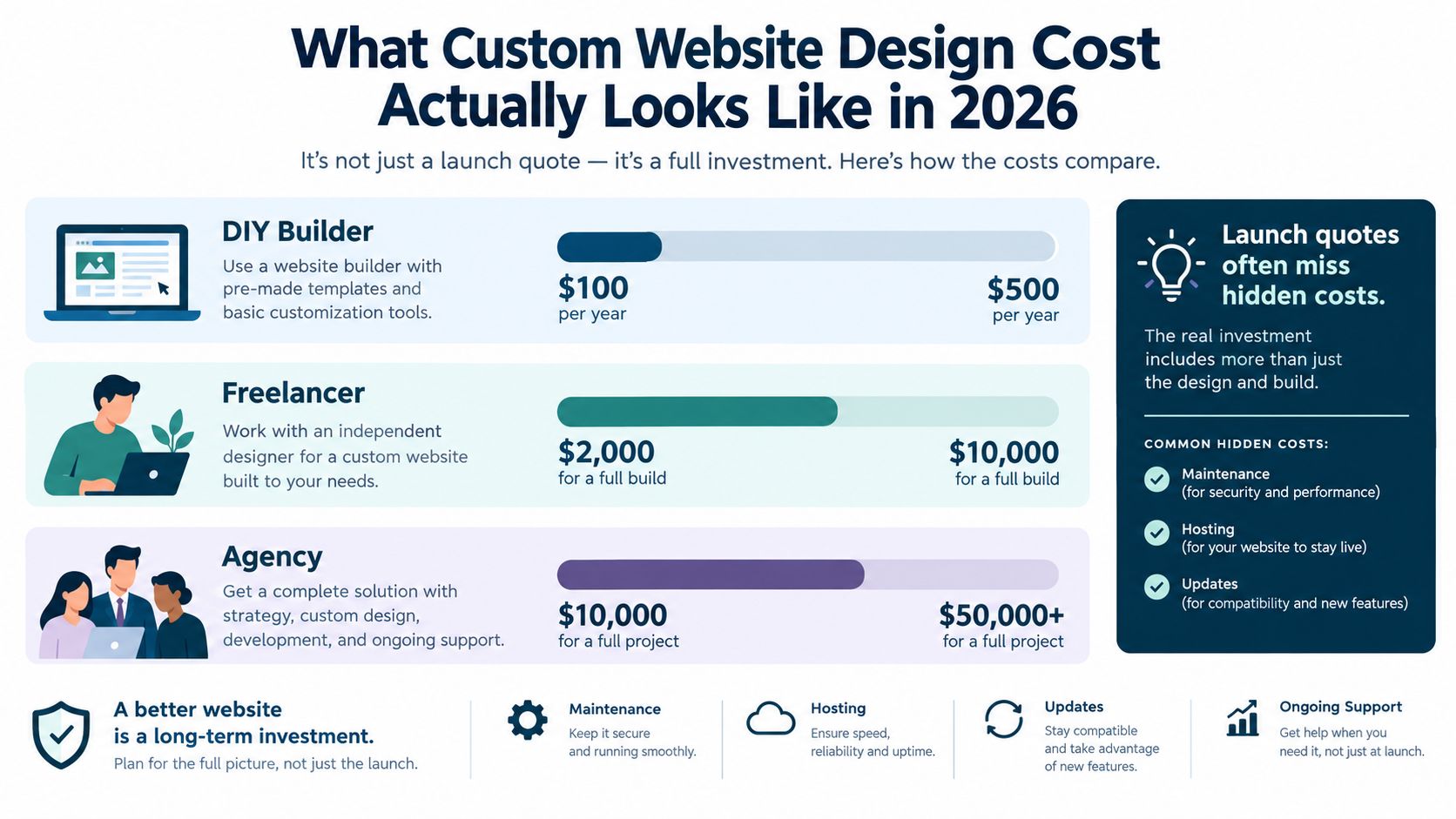
SiteGround's website cost comparison places DIY builders at approximately $200 per year, freelancers at $1,500–$8,000 for initial development, and agencies at $6,000–$35,000 or more. Those are different purchasing arrangements, not interchangeable versions of the same service.
With a builder, you're buying software access and supplying much of the planning, content, and setup yourself. With a freelancer, you're purchasing someone's time and capabilities, so confirm which responsibilities they cover. With an agency, the price may include specialized roles, project coordination, testing, and continuing accountability. None of those arrangements guarantees quality merely by existing.
Compare responsibilities before prices
The distinction is who does the work and who owns the unresolved problems.
- DIY builder: Suitable when your requirements are straightforward and someone inside the organization can maintain the content and configuration.
- Freelancer: Worth considering when the scope fits their skills and you've established how support works after delivery.
- Agency or development partner: Appropriate when the project needs coordinated design, engineering, integrations, and operational support.
The visual below compares provider categories. Use the sourced figures above for budgeting rather than treating illustrative graphic ranges as a quote.
A polished homepage is only part of professional website work. Someone also has to organize content, define responsive behavior, configure forms, test integrations, prepare deployment, and establish support ownership. The proposal should make those responsibilities visible.
Separate buying the website from operating it
Keep distinct budget categories for the initial build, necessary operations, and optional improvements. Hosting and software renewals belong in operations. A new campaign landing page belongs in improvements. Combining everything into a single unexplained monthly charge makes future decisions harder.
If you're evaluating providers in a different market, UpTime Web Hosting's resource to compare website design costs Australia offers another comparison starting point. Check currency, scope, and support terms before comparing its prices with domestic proposals.
Budget rule: Compare complete responsibilities, not just totals at the bottom of the page.
Pricing Models and What Each One Really Buys You
Hourly, fixed-fee, and value-based pricing allocate uncertainty differently. My recommendation is to choose the arrangement that matches how well you understand the work, rather than whichever sounds simplest during a sales call.
Hourly pricing fits investigation, troubleshooting, and evolving work. You pay for actual effort, which is sensible when nobody yet knows why an existing integration keeps failing. Ask for a spending ceiling, progress updates, and approval before the provider exceeds the agreed allowance.
Fixed-fee pricing fits a defined build. You agree on deliverables and a price, giving you a clearer purchasing decision. But the protection comes from the scope document, not the words “fixed fee.” Undefined content work or an unspecified CRM connection can still become an additional charge.
Pricing Models at a Glance
| Model | Best For | Risk for Buyer |
|---|---|---|
| Hourly | Diagnostics, repairs, exploratory development, ongoing changes | Paying for more effort than expected without approval controls |
| Fixed-fee | A build or rebuild with clear requirements and acceptance criteria | Assuming unspecified work is included |
| Value-based | Strategically important projects with clearly defined business objectives | Paying a premium without clear deliverables or accountability |
Value-based pricing connects the fee to the importance of the business problem rather than counting production hours. That can be reasonable for a critical booking workflow or a customer-facing application. It still needs a contract describing what you'll receive. A discussion about business value isn't a substitute for engineering detail, and it isn't a promise of revenue.
Don't confuse wages with billing rates
The Bureau of Labor Statistics reports May 2025 median pay of $104,000 for web and digital interface designers and $92,650 for web developers, approximately $50/hour and $45/hour, respectively, before employer overhead and other delivery costs, in its web developer and digital designer occupational overview.
Those figures aren't suggested freelance rates. They help explain why a project involving both design and engineering requires a different budget from visual adjustments alone.
The distinction between website design and website development matters when comparing proposals. A design-only engagement may deliver approved layouts without a functioning website.
For an uncertain rebuild, I'd favor paid discovery before committing to a fixed build price. For continuing improvements, hourly work or a defined support arrangement can be more practical. Buy certainty where it exists. Don't ask a provider to disguise uncertainty as a confident number.
The Line Items That Actually Drive the Quote
Page count is a weak stand-in for complexity. A collection of service pages can share a layout, while a single account dashboard may require authentication, permissions, data connections, and extensive testing.
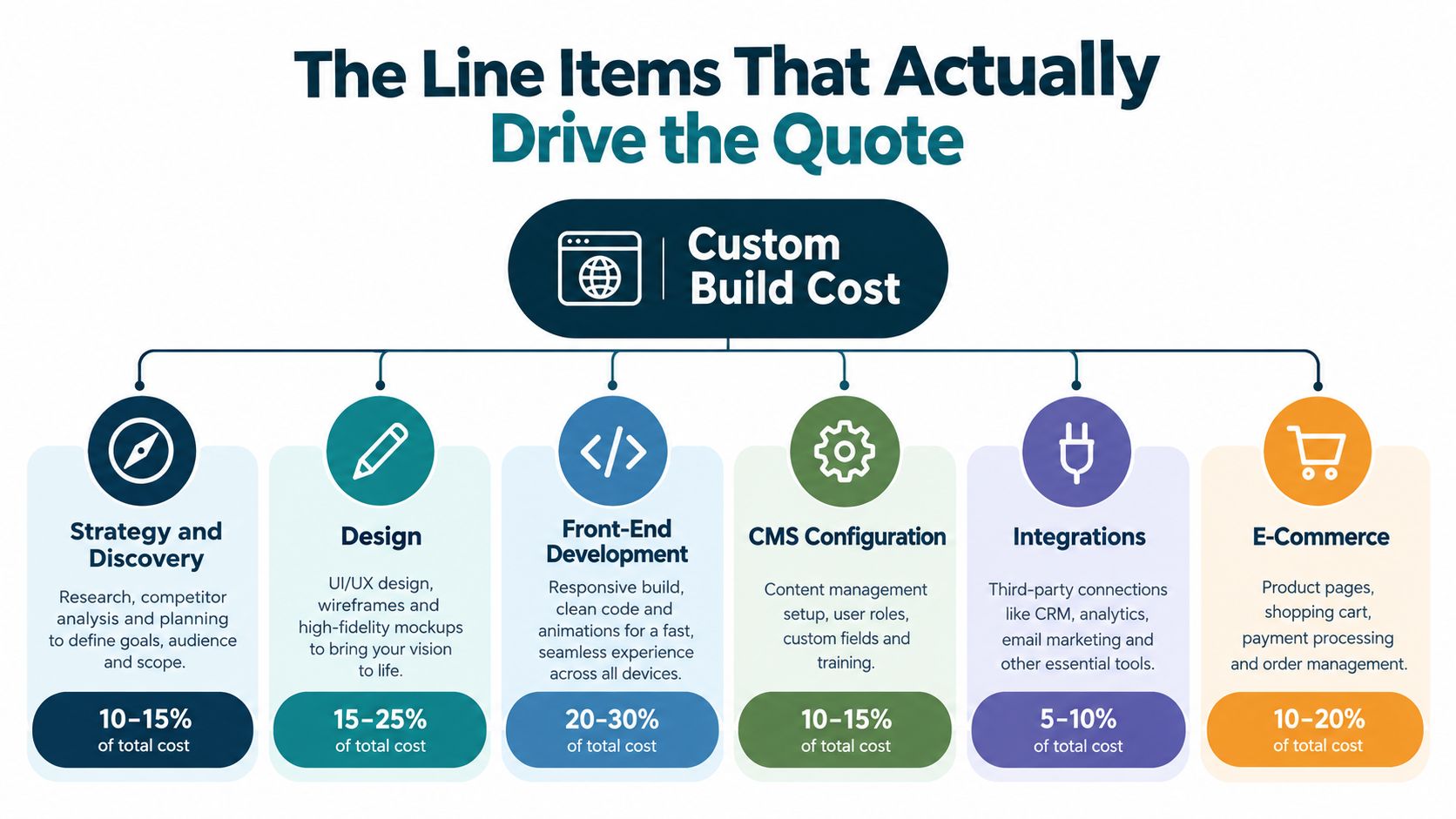
Ask for deliverables by workstream. Don't accept a percentage chart as a substitute for a scoped estimate. There isn't a defensible universal dollar range for every component below, because the work changes with the requirement.
The breakdown graphic is useful for identifying categories, not assigning fixed shares of your budget.
Price the actual deliverables
| Workstream | What the estimate should identify |
|---|---|
| Strategy and discovery | Goals, audiences, sitemap, workflows, technical constraints |
| Interface design | Unique layouts, reusable components, mobile behavior, revision allowance |
| Front-end development | Responsive implementation, interactions, supported browsers |
| CMS configuration | Content types, editing controls, permissions, publishing needs |
| Integrations | Connected systems, field mapping, authentication, failure handling |
| E-commerce | Catalog structure, checkout, shipping rules, inventory connections |
| Content and SEO foundation | Migration, URL mapping, metadata responsibilities, analytics setup |
| Quality and launch | Accessibility testing, performance work, security setup, deployment checks |
An integration deserves particular scrutiny. A form that emails a message isn't equivalent to a form that creates a CRM record, assigns an owner, handles duplicates, and reports failed submissions. Specify the behavior, not merely the software name.
Documenting website design requirements gives each provider the same problem to price. Without that shared definition, comparing totals is mostly comparing assumptions.
Make performance part of acceptance
Performance work belongs in the estimate before you approve elaborate visuals. HTTP Archive defines good Core Web Vitals at the 75th percentile as LCP under 2.5 seconds, INP under 200 milliseconds, and CLS under 0.1, as described in its technology performance reporting.
In plain English, those measures concern loading, response to interaction, and visual stability. Ask the developer to identify image limits, JavaScript constraints, font choices, caching responsibilities, and mobile testing. Define how field performance will be assessed when sufficient usage data is available, rather than accepting a desktop screenshot as the entire test.
For an additional perspective on the design-and-build discussion, the video below provides another viewing option.
Real Price Ranges by Site Type and Complexity
Your website's job should determine the budget category. Start with the customer action and the internal workflow, then price the system needed to support them.
A worldwide development-cost guide gives a basic professional site roughly $4,000–$10,500 in year one and an e-commerce site $10,000–$35,000, while also estimating $5,000–$15,000 for migration when businesses outgrow DIY platforms; these are broad benchmarks, not build-only or annual-operations quotes, in Zoom Into Web's website development cost guide. Its figures support looking across 24–36 months, rather than treating launch day as the end of the investment.
There isn't a reliable annual operations range for every site type in those benchmarks. Don't manufacture one by dividing a project price. Request the build and operating estimates separately.
Match the budget to the website's job
| Site type | Build requirements to price | Recurring operations to price | Outcome to measure |
|---|---|---|---|
| Brochure site | Service content, shared layouts, contact details, simple inquiry form | Hosting, renewals, maintenance, routine content updates | Relevant inquiries or bookings |
| Lead-generation site | Campaign pages, qualified-lead forms, CRM routing, tracking | Integration checks, reporting, landing-page changes | Qualified leads and completed bookings |
| Membership or nonprofit site | Accounts, permissions, gated content, donation workflows | Account support, payment-service upkeep, accessibility checks | Completed donations or member activity |
| E-commerce platform | Product data, checkout, shipping, inventory connections | Catalog changes, checkout testing, integration support | Completed orders and conversion rate |
A nonprofit isn't automatically a simple project. Donation rules, member permissions, and documents can introduce substantial work even when the public website looks restrained. Likewise, a service company's brochure site can become a lead-management system once inquiries need qualification and routing.
Use a working ownership-cost model
Create a spreadsheet with columns for launch, each operating year, and planned changes. Use provider quotes and actual vendor charges in these rows:
- Build investment: Discovery, design, engineering, content, testing, and deployment.
- Technical operations: Hosting, domains, licenses, backups, security maintenance, and support.
- Business operations: Content changes, reporting, integration administration, and accessibility reviews.
- Planned improvements: Approved features or campaigns, kept separate from routine upkeep.
- Exit costs: Data export, documentation, transition assistance, and potential migration.
Your calculation is straightforward:
Ownership cost = initial build + operating expenses + approved improvements + transition costs.
Keep payment-processing or other usage-based charges visible where relevant. They shouldn't disappear inside a generic maintenance allowance.
A recurring expense earns its place when you can explain what it protects, what it enables, or what decision it helps you make.
Don't judge backups by lead volume. Judge them by recoverability. Don't judge campaign work by whether the server stayed online. Match each expense to the right purpose.
Reading a Proposal Without Getting Burned
Put competing proposals beside each other and compare included work, assumptions, exclusions, and acceptance criteria. Only then compare price.
A neatly formatted proposal can still leave basic responsibilities unresolved. Who writes the copy? Who transfers the old content? Who purchases licenses? Who fixes a broken integration after a third-party service changes? If the document doesn't answer, ask before signing.
UK government monitoring guidance treats accessibility assessment as a financial cost-benefit exercise, including remediation costs and the organization's available budget, in its accessibility monitoring guidance. Apply that same clarity to the whole proposal: identify what you're funding, what remains unresolved, and what could trigger additional work.
Questions that expose vague scope
- Discovery: What written decisions or requirements will I receive?
- Design: Which unique layouts are included, and what revision allowance applies?
- Development: Which functions are included, and how will we test their behavior?
- Content migration: Which pages, documents, images, and records will move?
- Integrations: Who supplies access, resolves vendor limitations, and checks failure cases?
- Launch: Who handles deployment, verifies forms, and confirms tracking?
- Support: What counts as a defect, an update, an emergency, or a new request?
Use a design brief layout to organize your goals, content responsibilities, and approval process before soliciting final estimates. A provider can price a documented requirement more clearly than an idea scattered across email threads.
For the search-related portion, LLMrefs' technical SEO audit checklist is a useful discussion prompt. Ask the provider which checks are included and what evidence you'll receive. A checklist reference isn't proof that someone has performed the work.
Watch the acceptance language
“ADA-compliant” is too vague on its own. A Congressional Research Service report on website accessibility explains that no generally applicable binding rule defines website accessibility for all private businesses or nonprofits under Title III, while identifying WCAG as a referenceable technical standard.
Ask for the target standard, conformance level, tested pages, manual testing scope, exclusions, and remediation responsibilities. Government projects require their own jurisdiction-specific review; don't borrow a private-business contract and assume it fits.
Also confirm ownership and access. Your organization should understand who controls the domain, hosting account, CMS credentials, source files, and connected services.
Contract test: If you can't tell how a deliverable will be accepted, you haven't finished defining it.
Bundled pricing isn't suspicious. Bundled pricing with no supporting scope is. Ask for the missing detail, not merely a discount.
Why the Cheapest Quote Often Becomes the Most Expensive
The cheapest quote becomes expensive when you later have to buy omitted work while keeping the live business running. That's different from a modest website that genuinely meets modest needs.
A template isn't the villain. Neither is a small budget. The problem is purchasing a limited implementation while expecting it to behave like a carefully planned business system.
The cost pressure is easier to understand when launch spending and later repairs sit on the same page.

Accessibility repairs are real project work
A11y Collective reports that WebAIM's 2024 analysis found basic WCAG failures on 95.9% of the one million most frequently visited homepages. It also estimates $500–$2,500 for a basic accessibility review, $2,500–$10,000 for an expert audit, $5,000–$20,000 for technical remediation, and $200–$1,000 per month for ongoing maintenance, in its accessibility compliance cost guide.
Those aren't automatic charges for your website, and they shouldn't all be added together without assessing scope. They show that accessibility repair can be a substantial separate engagement.
Fixing navigation, form labels, contrast, documents, and interactive components may involve both code and content. An automated scan alone doesn't define that workload. Include human testing and an agreed remediation process where the project requires them.
Deferred work changes the buying conditions
The migration benchmark discussed earlier illustrates another exposure. A platform change can require content restructuring, data transfer, replacement integrations, and staff retraining. The subscription you stop paying is only part of the decision.
Security upkeep has a different purpose again. Assign responsibility for updates, backups, restore testing, access management, and incident handling. A website that remains online hasn't necessarily been maintained properly.
- Unpriced migration: Ask whether content and business data can be exported in usable formats.
- Unowned maintenance: Name the person or provider responsible for technical upkeep.
- Unfunded testing: Establish what gets checked after software or content changes.
- Undefined support: Confirm how urgent problems are reported and handled.
A breakdown of average website maintenance cost can help you identify the services to compare. The key distinction is between buying server space and buying someone's responsibility for keeping the system usable.
Choose the lower quote when it covers the same necessary work. Don't choose it because the missing work is harder to see.
Smart Ways to Lower Cost Without Cutting Corners
Reduce unnecessary production work, not the checks that tell you whether the website functions. That's the cleanest way to lower custom website design cost without creating a repair project.
Start by separating launch requirements from possible future additions. A founder may need clear service information and reliable inquiries now, without needing customer accounts yet. A nonprofit may need an accessible donation journey more urgently than a redesigned archive.
The distinction should reflect business priorities, not whichever feature sounds most interesting in a meeting.
Spend less on avoidable custom work
Reuse proven layouts and components where they fit. A shared service-page structure can still support distinct messaging, imagery, and calls to action. You don't need a new layout every time the subject changes.
Prepare approved content, brand assets, product information, and access credentials before production starts. This lets the team design around real material instead of guessing how much text or data will eventually arrive.
- Keep custom features accountable: Identify the business action each feature supports.
- Evaluate existing tools: Check whether an established component meets the requirement before commissioning custom code.
- Choose practical editing controls: Give staff the flexibility they need without making every layout freely rearrangeable.
- Consolidate feedback: Assign an accountable approver and resolve conflicting comments before sending revisions.
- Protect acceptance criteria: Keep form testing, accessibility requirements, and launch checks even when you reduce visual scope.
Select the delivery arrangement deliberately
Platform choice should follow requirements and staff capacity. WordPress, Wix, Squarespace, and commerce-focused options belong in the comparison when they fit the actual job. Don't pay for maximum flexibility when your team needs straightforward publishing, and don't force a simple publishing setup to serve as a custom application.
Staffing deserves the same discipline. If you're considering international development talent, HireDevelopers.com's option to hire developers from Brazil is one avenue to investigate alongside domestic freelancers and agencies. Evaluate communication overlap, technical fit, review responsibility, documentation, and continuing support. Geography alone doesn't establish value.
Finally, preserve your exit options. Ask for usable documentation, account access, and a clear handoff. A budget-friendly project should remain manageable when staff or suppliers change.
The goal isn't to buy the most website you can afford. It's to buy the right website and leave enough budget to operate it well.
Bruce and Eddy offers website strategy, custom development, and ongoing hosting, security, and maintenance support. Visit Bruce and Eddy with your current website, required functions, and budget constraints to discuss a scope that separates the build from the cost of running it.
