

When you're looking to create a sitemap for your website, you've got two main paths: using automated tools like a CMS plugin for a quick, hands-off approach, or diving into manual creation if you want granular control over the final file. Both methods get you to the same end goal: a structured list of your site's URLs that search engines can easily follow.
Why a Sitemap Is Your Website's Roadmap for Google
Think of a sitemap as your direct line of communication to search engines like Google and Bing. Instead of just hoping their crawlers find all your pages by following links, you're handing them a neatly organized map that says, "Here are all my important pages, please take a look."
This simple act can be a game-changer, especially for new sites with few external links or massive websites with thousands of pages. It helps prevent your most valuable content from getting lost in the digital shuffle.

XML vs. HTML Sitemaps: What's the Difference?
It’s easy to get these two confused, but they serve completely different audiences. One is for robots, the other is for people.
-
XML Sitemaps are built specifically for search engine crawlers. This is a technical file, written in Extensible Markup Language (XML), that lists all your URLs. It can also include helpful metadata, like when a page was last updated, which tells search engines how fresh your content is.
-
HTML Sitemaps, on the other hand, are designed for your human visitors. It’s just a regular webpage with a structured list of links, almost like a table of contents for your entire site. It helps users find what they’re looking for quickly.
While both are valuable, the XML sitemap is our main focus when we talk about SEO and getting your site properly indexed. A solid sitemap is a core part of any SEO-friendly website design because it makes your site’s architecture crystal clear to search engines right from the start.
To make the distinction even clearer, here’s a quick side-by-side comparison.
XML vs HTML Sitemaps Quick Comparison
| Feature | XML Sitemap | HTML Sitemap |
|---|---|---|
| Primary Goal | Help search engine crawlers discover and index all of your website's pages | Help human visitors navigate your website and find content easily |
| Audience | Search engine bots (e.g., Googlebot, Bingbot) | Human users |
| Format | A specific, machine-readable XML file (sitemap.xml) |
A standard HTML webpage with a list of links (e.g., yoursite.com/sitemap) |
| Key Benefit | Improves indexing efficiency and ensures all important pages are discovered. | Enhances user experience and provides an alternative way to navigate the site. |
This table really highlights how each sitemap plays a unique role. One is a technical tool for search visibility, while the other is a user-facing navigational aid. You can, and often should, have both.
Why Sitemaps Are a Cornerstone of Technical SEO
Let’s be clear: submitting a sitemap won't magically shoot you to the top of the rankings. What it does do is eliminate uncertainty. You're telling search engines exactly which pages you consider important, making sure they don’t miss your cornerstone blog posts, key product pages, or that piece of content you just published.
Sitemaps have come a long way since the early 2000s. The introduction of the XML sitemap protocol in 2005 was a huge leap forward, revolutionizing how search engines could crawl and index pages much more efficiently. This became a lifeline for large e-commerce sites or brand-new blogs where internal linking might not yet be strong enough to guide crawlers effectively.
A sitemap is your way of ensuring no page gets left behind. It’s a foundational piece of technical SEO that signals to Google that you have a well-organized, crawlable website ready for discovery.
To really appreciate its impact, it helps to zoom out and look at the bigger picture. Gaining a deeper understanding the broader scope of technical SEO reveals how sitemaps fit into the larger strategy of optimizing your site’s infrastructure for search visibility. Ultimately, a sitemap is more than just a file; it’s a declaration of your site’s structure and priorities.
Planning Your Sitemap for Maximum SEO Impact
Before you even think about generating a file, the real work begins. Strategic planning is what separates a useless list of URLs from a powerful SEO tool that actively guides search engines to your most important content. Without a plan, you risk sending mixed signals to Google, and that's never a good thing.
A great sitemap starts with a crystal-clear understanding of your own website. You have to decide which pages are worthy of a search engine's attention and which are better left undiscovered. This isn't just about listing everything; it's about curating a focused guide to your site's best assets.
Conduct a Quick Content Audit
First things first, you need to identify your most valuable pages. These are the URLs that directly support your business goals. Put yourself in your customer's shoes: which pages do you want them to find in search results when they're looking for what you offer?
A simple audit involves categorizing your content into a few key buckets:
- Primary Pages: These are your non-negotiables. Think homepage, core service or product pages, and your main "About Us" or "Contact" pages.
- High-Value Content: This is your cornerstone stuff—in-depth blog posts, detailed guides, or case studies that showcase your expertise and pull in your target audience.
- Conversion-Focused Pages: This bucket includes any landing pages for specific campaigns, pricing pages, or pages with lead-generation forms.
This initial list is the backbone of your sitemap. It’s basically a declaration to Google of what truly matters on your website.
Know What to Exclude
Just as important as knowing what to include is knowing what to leave out. Shoving low-value or duplicate pages into your sitemap can dilute the authority of your important ones. It also wastes Google's crawl budget—the limited amount of time and resources it allocates to crawling your site.
Here are the usual suspects you should almost always exclude:
- Non-canonical URLs: Any page with a canonical tag pointing to another URL has to go. Including it sends conflicting signals about which version is the master copy.
- Internal Search Results: Those search result pages on your own site (
yoursite.com/?s=query) offer zero unique value and can create a near-infinite number of low-quality pages for Google to sift through. - Login and Admin Pages: Pages like
/wp-admin,/login, or user account pages are irrelevant to the public and have no business being indexed. - Thank You Pages: While they're vital for tracking conversions, these pages don't need to be indexed and rarely offer standalone value to someone searching online.
- Archived or Tag Pages: Unless your tag and category pages are uniquely valuable and well-curated, they often just create duplicate content issues. It's usually best to leave them out.
By pruning these pages from your plan, you present a much cleaner, more authoritative picture of your site to search engines.
A sitemap isn't just a list of all your pages—it's a curated map of your best pages. Excluding low-value URLs is as important as including high-value ones.
Establish a Clean URL Structure
Finally, your sitemap’s effectiveness is directly tied to your site's architecture. A logical URL structure makes your sitemap easier for search engines to process and reinforces the topical relevance of your pages. For example, a clean structure like yoursite.com/services/web-design is far more intuitive than something like yoursite.com/page-id-123.
When your site is well-organized from the start, sitemap planning becomes almost effortless. For a deeper dive, our guide on how to plan website structure provides a solid framework for building a foundation that supports both user experience and SEO.
Ultimately, creating and optimizing a sitemap is all about helping your website drive organic growth. This foundational step is just one of many proven SEO strategies to increase organic traffic and ensure your best content gets the visibility it deserves.
Generating Your Sitemap, With and Without Tools
Okay, you've mapped out the structure of your sitemap. Now it's time to actually create the file. You've got two main paths you can take here: the old-school, hands-on manual approach, or the much more common automated process using a dedicated tool.
Honestly, which one you choose comes down to your site's complexity, how comfortable you are with code, and how much control you want. If you're running a small, static website that barely ever changes, building it manually is totally doable. But for almost everyone else with a modern, dynamic site, automated tools are the only practical way to go. They'll save you a ton of time and prevent the inevitable human errors that creep in.
Here's a quick look at the typical workflow when you let a tool do the heavy lifting:
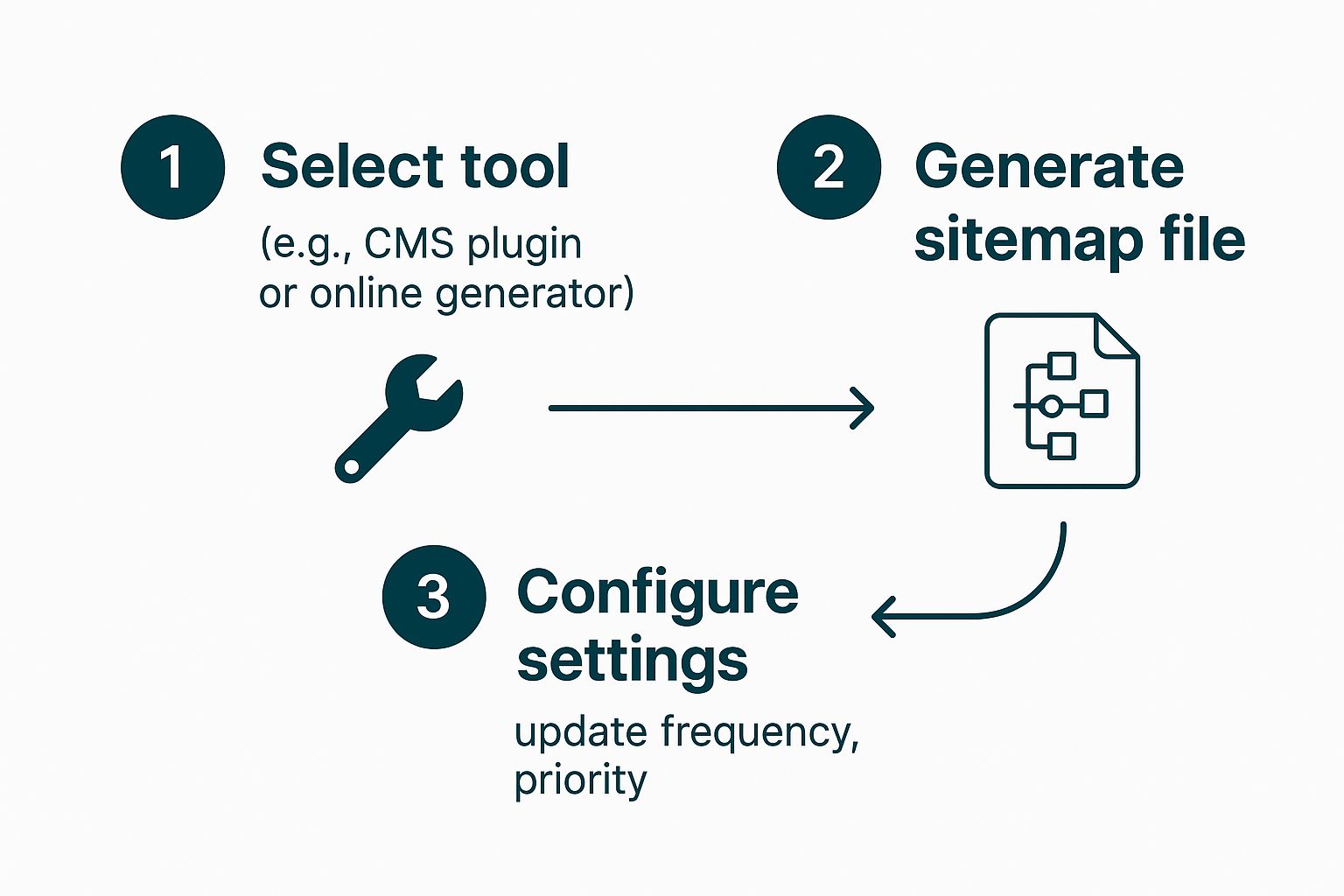
As you can see, whether you're using a CMS plugin or a web-based generator, the core steps are pretty much the same. You pick your tool, tweak the settings to match the plan you just made, and let it generate the file.
The Manual Method: A Hands-On Approach
If you really want to get under the hood and understand how a sitemap talks to search engines, creating one by hand is a great learning experience. It gives you absolute control over every single detail. All you need is a basic text editor, like Notepad on Windows or TextEdit on a Mac, to write the XML code.
You'd start by creating a new file and saving it as sitemap.xml. Inside that file, you'll list out your URLs using specific XML tags. For just one page, the code looks something like this:
Let’s quickly break down those tags:
<urlset>: This is the main tag that wraps the whole file. Think of it as the container.<url>: This tag holds all the info for a single page URL.<loc>: The most important one. This is where you put the full, complete URL of the page.<lastmod>: This optional tag tells search engines when the page was last updated, using a YYYY-MM-DD format.
You just repeat that <url> block for every single page you want to include. While it's precise, you can probably see how this gets incredibly tedious—and easy to mess up—for any site with more than a dozen pages.
Leveraging Automated Tools and Plugins
For the vast majority of us, automated tools are the answer. These tools are designed to crawl your website, pull together all the URLs, and spit out a perfectly formatted sitemap.xml file without you having to touch any code.
CMS Plugins for Effortless Sitemaps
If your site is built on a Content Management System (CMS) like WordPress, this is the easiest route by far. In fact, since WordPress version 5.5, a very basic XML sitemap is created automatically. However, dedicated SEO plugins give you way more control and better features.
Plugins like Yoast SEO or Rank Math are the industry standard for a reason. They don't just create your sitemap; they keep it updated in real-time. Every time you publish a new blog post or update a page, the sitemap is refreshed automatically. No extra work required.
Just like in the screenshot above, you can usually just flip a switch to turn on XML sitemaps. Then you can go in and configure exactly which post types or categories to include or exclude, putting the audit you did earlier into practice.
If you're on WordPress, installing a good SEO plugin is non-negotiable. It handles sitemap generation flawlessly and ties it into a full suite of tools you'll need for things like figuring out https://www.bruceandeddy.com/what-is-keyword-research-in-seo/ and on-page optimization.
Online Sitemap Generators
What if your site isn't on a CMS that supports plugins? No problem. Online sitemap generators are a great alternative. Tools like XML-Sitemaps.com or the desktop app Screaming Frog SEO Spider will crawl your live site and generate a sitemap file for you to download.
You just pop in your homepage URL and let the tool do its thing. The main catch here is that it's a one-time process. Every time you make major changes to your site, you'll need to remember to re-run the generator and upload the new sitemap file.
Configuring Your Automated Sitemap
After you've picked your tool, you need to configure it. This is where your sitemap plan comes to life. Inside your plugin or tool settings, you’ll be able to:
- Select Content Types: Pick which types of content should be in the sitemap. For example, you’ll probably want to include posts and pages but exclude things like media attachment pages.
- Exclude Specific Posts or Pages: Most tools let you paste in URLs for individual pages you want to hide, like "Thank You" pages or private login areas.
- Manage Taxonomies: You can decide whether to include your category and tag pages. As we talked about during the planning stage, it's usually best to leave these out unless they provide real value to users.
While XML sitemaps are essential for search engines, it's also worth knowing the specifics of an HTML sitemap. These are built for human visitors and can seriously improve site navigation and internal linking, which is a nice little boost for your SEO. Some tools can even generate both types, giving you a complete solution.
Submitting Your Sitemap to Google and Bing
You’ve done the hard work of planning and generating a pristine sitemap. But here’s the reality: that file is completely useless until search engines know where to find it. Submitting your sitemap is the final, crucial step that bridges the gap between your website and the search engine crawlers.
This process essentially rolls out the welcome mat for Googlebot and Bingbot, inviting them to crawl your site more intelligently. Think of it as handing over the architectural blueprints of your website directly to the builders. It removes all the guesswork and ensures they see the structure exactly as you intended.

First Things First: Validate Your Sitemap
Before you even think about submitting, take a moment to validate your sitemap. This is a simple pre-flight check that can save you a world of headaches down the line. Submitting a sitemap with errors is like giving someone a map with incorrect street names—it just causes confusion.
You can use a free online XML sitemap validator to quickly check your file for common formatting errors. These tools will instantly flag any broken links, incorrect syntax, or other issues that would cause a search engine to reject the file. Seriously, it's a five-minute task that ensures everything goes smoothly.
Once it's validated, the next step is placing the file in the correct location. Your sitemap file, typically named sitemap.xml, must be uploaded to the root directory of your website. This just means it should be accessible at yourwebsite.com/sitemap.xml. This is the standard location search engines look for by default.
Submitting to Google Search Console
With your sitemap validated and in place, you’re ready to formally introduce it to Google. This is done through Google Search Console (GSC), an essential free tool for any website owner. If you haven’t set it up yet, do so immediately.
Here’s how easy it is to submit:
- Log in to your Google Search Console account and select your website property.
- Navigate to the Sitemaps report, which you'll find under the "Indexing" section in the left-hand menu.
- In the "Add a new sitemap" field, you’ll see your domain pre-filled. Simply type the name of your sitemap file (e.g.,
sitemap.xmlorwp-sitemap.xml). - Click the Submit button.
That’s it. GSC will then begin processing your sitemap. The status will initially show as "Submitted" and will later change to "Success" once Google has crawled and processed it. This can take anywhere from a few hours to a few days, so be patient.
Submitting to Bing Webmaster Tools
While Google is the dominant player, you shouldn't ignore Bing. Bing Webmaster Tools works very similarly to GSC, and submitting your sitemap there is just as important for reaching a wider audience.
The steps are nearly identical:
- Sign in to your Bing Webmaster Tools account and choose your site.
- From the left sidebar, click on Sitemaps.
- Click the Submit Sitemap button at the top right.
- Enter the full URL of your sitemap (e.g.,
https://yourwebsite.com/sitemap.xml) in the provided field. - Click Submit.
Bing will then add your sitemap to its queue for processing. Just like with Google, you can monitor its status directly from the dashboard to see when it was last crawled and how many URLs were discovered.
Submitting your sitemap isn't a one-and-done task. It's the beginning of a conversation with search engines. Regularly checking your sitemap reports in GSC and Bing Webmaster Tools will give you valuable insights into how they see and crawl your site.
Monitoring Your Sitemap Status
After submission, your job shifts to monitoring. The Sitemaps report in both GSC and Bing Webmaster Tools is your command center. Here, you can see if the submission was successful, identify any errors, and view the number of URLs Google and Bing have discovered from your file.
If you see a "Couldn't fetch" or "Errors" status, don't panic. Just click on the sitemap to see the specific issues. Common problems include pages being blocked by your robots.txt file or URLs returning a 404 error. Addressing these issues promptly is key to maintaining a healthy relationship with search engines.
For smaller companies trying to manage their online presence, keeping an eye on these technical details is a core part of effective SEO services for small businesses. It ensures your foundational SEO is solid, allowing your content to perform its best.
Leveraging Advanced Sitemap Strategies
So you've nailed the basics of sitemaps. Great. But if you want to move beyond just having a functional sitemap to having a strategic one, it’s time to dig into some more advanced tactics. This is especially true for large, complex websites where a single sitemap file just won't cut it.
These pro-level strategies are all about giving search engines clearer, more granular signals about your site’s structure and which content you prioritize. It's the difference between just giving Google a map and giving it a detailed, annotated atlas with points of interest highlighted.

Taming Large Websites with a Sitemap Index
What do you do when your site has tens of thousands—or even hundreds of thousands—of pages? A standard sitemap has its limits: 50,000 URLs and a 50MB file size. For big e-commerce stores, sprawling news publications, or massive blogs, hitting that ceiling is a real possibility.
The solution here is a sitemap index file. Think of it as a table of contents for all your sitemaps. It’s a simple file that does one thing: it lists the locations of all your individual sitemap files.
For example, you could break your site down logically like this:
- Product pages (
products-sitemap.xml) - Blog posts (
blog-sitemap.xml) - Static pages like "About Us" (
pages-sitemap.xml)
Instead of submitting three separate files, you just submit the one sitemap index file to Google Search Console. Google then finds and processes all the sitemaps listed within it. This keeps everything tidy, manageable, and safely under the technical limits.
A sitemap index is the enterprise-level answer to managing a complex site architecture. It lets you segment your content logically, which makes it much easier to track indexing performance for different sections of your site in Search Console.
Unlocking Traffic with Specialized Sitemaps
Let's be real: not all content is the same. Search engines certainly don't treat it that way. While a standard XML sitemap is perfect for your regular web pages, you could be leaving traffic on the table if you have a lot of rich media.
That’s where specialized sitemaps come in. These sitemaps use extra tags to give crucial context about your media, helping it show up in specialized search results like Google Images, Video, or News. Getting this right can open up entirely new channels for discovery.
While there are a few different types, these specialized sitemaps are the most common and offer the biggest potential impact.
Specialized Sitemap Types and Their Purpose
| Sitemap Type | Primary Purpose | Ideal For |
|---|---|---|
| Image Sitemap | Provides details like image location, title, and caption to help Google index your images more effectively. | E-commerce sites, photographers, and any blog with a ton of original visual content. |
| Video Sitemap | Gives context about your videos, including the thumbnail, duration, title, and description. | Video creators, educational sites, and any business using video as a core part of its marketing strategy. |
| News Sitemap | Helps Google News discover new articles very quickly; it’s limited to sites that have been approved for Google News. | News publishers, media outlets, and high-frequency blogs that cover timely topics. |
Taking the time to create these files is a key part of learning how to create a website sitemap that truly covers all of your valuable assets, not just your pages.
Keeping Your Sitemap Fresh and Accurate
An out-of-date sitemap can be worse than having no sitemap at all. It sends confusing signals to search engines, telling them to crawl pages that might not exist anymore or ignoring brand-new content. It's just a waste of crawl budget.
This is why the <lastmod> tag is your best friend. This simple tag tells search engines the exact date a page was last modified. When a Googlebot sees a recent date, it’s a strong hint that there's fresh content worth re-crawling.
Keeping this tag consistently and accurately updated encourages crawlers to visit your important pages more often. The role of the sitemap has definitely gotten more sophisticated, and a well-maintained one can be a serious advantage, ensuring your critical pages get indexed promptly. For instance, major news sites like CNN rely heavily on sitemap indices that are updated constantly to reflect the latest articles. Want to learn more about where things are headed? Check out these 2025 sitemap creation guides on en.globalsense.com.tw.
Common Sitemap Questions Answered
Even with a solid plan, a few specific questions always seem to pop up when building and managing sitemaps. Getting these answers right is the final piece of the puzzle, ensuring your sitemap is working as hard as it can for your SEO.
Let's run through some of the most frequent queries we hear. These are the common points of confusion that, once cleared up, will give you total confidence in your sitemap strategy.

How Often Should I Update My Sitemap?
The honest answer? It depends entirely on how often your website changes. There's no magic number here, but a simple rule of thumb works wonders.
You should update your sitemap whenever you add, remove, or make a significant change to an important page.
- For active sites: If you run a blog, news site, or an e-commerce store with constantly changing inventory, automating this is a must. A daily update keeps signaling to search engines that there's fresh content worth crawling.
- For static sites: If your site content rarely changes, you only need to regenerate and resubmit the sitemap when that change actually happens. No need to overdo it.
The whole point is to make sure your sitemap is an accurate, real-time reflection of what’s live on your site.
Does My Small Website Really Need a Sitemap?
Yes, it’s still a fantastic idea. While sitemaps are non-negotiable for massive, complex sites, they offer real benefits for smaller ones, too. Think of it as standard professional practice.
A sitemap is your SEO safety net. It guarantees that search engines know about every single page you want them to see, even if your internal linking isn't perfect yet. Considering how easy it is to generate one with modern tools like a WordPress plugin, the tiny bit of effort provides some serious peace of mind.
What Is the Difference Between Priority and Changefreq Tags?
You've probably seen <priority> and <changefreq> tags floating around in sitemap examples. In theory, the first suggests a page's importance relative to others, and the second gives a hint about how often it's updated.
Here's the deal: major search engines like Google have been very clear that they largely ignore these tags now. Their crawling algorithms are just too sophisticated to need these hints anymore.
Your energy is much better spent focusing on the <loc> (the URL) and <lastmod> (last modified date) tags. Keep those perfectly accurate, as they are the ones that still carry real weight with search engines.
What Should I Do If My Sitemap Has Errors in Google Search Console?
First off, don't panic. This is a common bump in the road and almost always has a straightforward fix. When Google Search Console flags an error, it’s just giving you a breadcrumb trail to follow.
Click into your sitemap report to see the specific errors it found. The usual suspects include:
- Broken links (404 errors): You’ve listed a URL in the sitemap that leads to a dead page.
- Blocked pages: The URL is in the sitemap, but your
robots.txtfile is telling Google not to crawl it. - Formatting mistakes: A simple typo or syntax error in the XML file itself.
A quick way to check your work is to run the file through a free online sitemap validator. Once you've found and fixed the problem, just regenerate the sitemap, upload the new version, and resubmit it in Search Console. It can take a few days for Google to process the update, so just check back periodically.
At Bruce and Eddy, we specialize in taking the guesswork out of technical SEO and website management. If you want a website that’s not just beautiful but also built for peak performance, let’s talk. Discover our custom web solutions at https://www.bruceandeddy.com.
