

A technical SEO audit is what you do when the site looks fine in a browser, the homepage still loads, and traffic starts slipping anyway. The usual culprit isn't one dramatic failure, it's a stack of smaller problems, like missing mobile content, slow templates, blocked resources, or URLs Google can find but not trust. Good audits don't just count errors, they reconcile what crawlers discover, what Google fetches and renders, and what users experience when the page is under pressure.
That matters because a checklist-only pass can miss the underlying pattern. A redirect chain can create duplicate canonical signals, those signals can muddy internal links, and suddenly the page that should matter most is getting the least help. If you want a broader primer on the mechanics, the SEO audit process and tools overview is a useful companion, but the work is in diagnosis, not box-ticking.
What a Technical SEO Audit Is For
A typical audit starts when someone says the quiet part out loud, traffic's down, the site still looks normal, and nobody can point to a single broken thing. That's the trap. The surface often looks clean while the technical layer is doing all the damage, one crawl gap at a time.
Diagnose the system, not just the page
A real technical SEO audit is a reconciliation exercise. It compares crawler data, Google's own processing signals, and field performance so you can separate harmless noise from problems that block discovery, indexing, or engagement. That's a lot more useful than a generic crawl export with a few red cells and no business context.
Practical rule: if a finding doesn't affect crawlability, indexability, renderability, or user experience, it probably doesn't deserve priority over the issue that's suppressing a money page.
That's especially true for smaller organizations. A nonprofit, startup, or local business usually doesn't have the luxury of fixing everything in one sprint, so the audit has to tell you what to fix first, what to monitor, and what can wait. If a redesign or CMS change removed mobile content, for example, the desktop version may still look polished while the crawlable version is thin enough to create indexation trouble.
Why the business lens matters
Bruce & Eddy's side of this is straightforward, websites live inside real operational constraints, not abstract SEO theory. When we look at a technical audit, we're trying to answer whether the site's structure, templates, and delivery choices are helping or hurting the work the business already paid for. That's the difference between “we found 143 issues” and “these three issues are blocking your most valuable pages.”
If you're comparing approaches, the practical question is simple, which problems are suppressing organic demand right now, and which ones just make the crawl report look busy? The answer usually saves time, budget, and a small pile of unnecessary heroics.
Build a Crawl and Indexation Inventory First
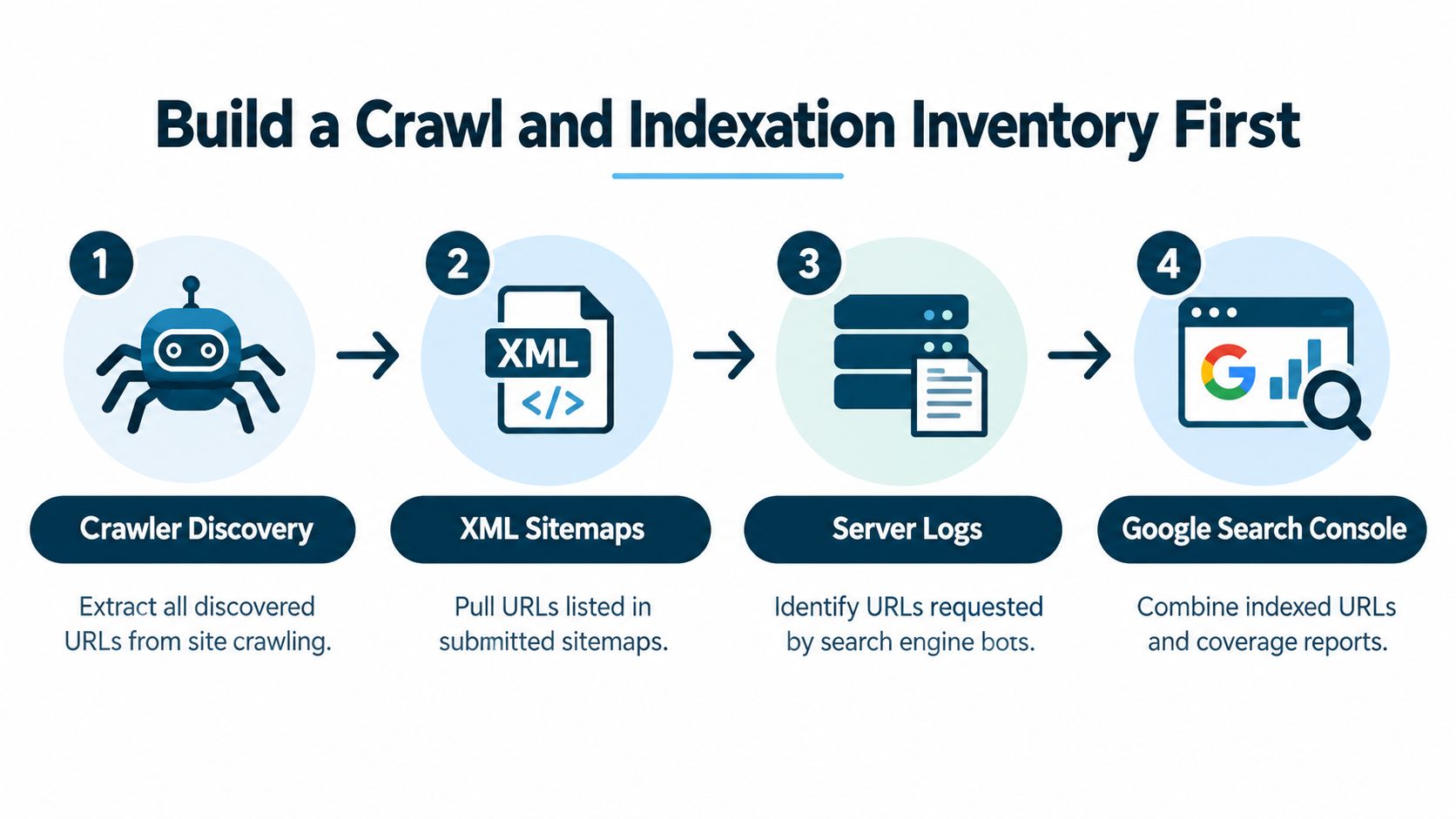
Start with a full URL inventory, not title tags. If you don't know which URLs exist, which ones are canonical, and which ones Google can see, every later check is built on sand. Crawlers are helpful, but they only show one slice of the picture.
Pull every source into one view
Export discovered URLs from a crawler, XML sitemaps, server logs, Google Search Console, and analytics, then normalize protocol, hostname, trailing slash, parameters, and case variants. That sounds tedious because it is, but it's also where the useful issues show up. One URL can exist in five forms, and search engines rarely care that your CMS thinks they're all “basically the same.”
Classify each URL by HTTP status, indexability directives, canonical target, internal-link depth, and organic impressions. That combination tells you whether a page is discoverable, eligible, preferred, and valuable. If a page has traffic but no crawl depth, or it's in a sitemap but blocked from crawling, you've found a problem with actual business consequences.
A solid inventory usually exposes orphan pages, sitemap URLs blocked by robots.txt, redirect chains, soft 404s, and pages returning 200 status with no meaningful content. Google's minimum indexability requirements are blunt, Googlebot must not be blocked, the page must return HTTP 200, and the page must contain indexable content, so a URL can fail even when it loads fine for a human Google's technical requirements.
Use the right filters, not just more data
A practical way to keep this sane is to group findings by URL type. For example, template families often behave the same way, so a broken pattern on one service page can imply dozens of similar pages are affected. That's far more actionable than a giant list of individual URLs with no pattern attached.
If you want another way to think about the same inventory discipline, the Boocoo guide to website SEO frames the crawl, index, and structure side of the work well. And if you need a quick internal reference for discovery work, use Bruce & Eddy's page-finding resource as a practical checkpoint rather than guessing what the site contains.
Useful habit: prioritize by affected organic demand and revenue importance, not by raw error count. A single broken template on a high-value page beats fifty harmless issues on dead-end URLs.
Distinguish Crawling Controls from Indexing Controls
One of the most common mistakes is treating robots.txt like a universal noindex switch. It isn't. Robots.txt tells crawlers what they may request, but it doesn't reliably keep a URL out of search results, especially if Google discovers that URL through external links Google on robots.txt.
Know what each control actually does
If a page should not be indexed, the cleaner pattern is usually to allow crawling and use a noindex directive through a meta tag or HTTP header. That gives Google a chance to fetch the directive and act on it. Blocking the page first can backfire, because the crawler may never see the noindex instruction at all.
Sitemaps play a different role again. They identify pages a site considers important and can help prioritize crawling, but they don't fence the crawler in. A sitemap should list canonical, indexable URLs, not redirects, 404s, blocked pages, or duplicate variants. If the sitemap and canonical signals disagree, the audit has found a governance problem, not just a technical one.
Fix the places where confusion costs the most
The highest-value cleanup tends to be pretty ordinary:
- Remove accidental robots.txt blocks from revenue pages or major service pages.
- Audit staging and internal search URLs so they're excluded in the right way.
- Compare sitemap entries to canonical and indexability signals and remove anything that shouldn't be there.
- Check duplicate URL variants so the site isn't telling search engines three different stories about one page.
That distinction matters because people often celebrate a successful robots.txt block and move on, while the URL is still discoverable elsewhere. Search engines don't award points for good intentions.
A sitemap should help reinforce the site's preferred structure, not fight it. When the sitemap, canonical tags, and indexability directives all point in the same direction, the crawl becomes much easier to interpret and a lot less expensive to maintain.
Measure Page Speed and Core Web Vitals by Template
A homepage test can make a weak site look healthy. It is often the easiest template to optimize and the least representative of real user journeys. Service pages, forms, blog posts, and campaign landing pages may load different assets, scripts, and third-party tools, so audit the templates that attract traffic and generate conversions.
Test the templates people actually use
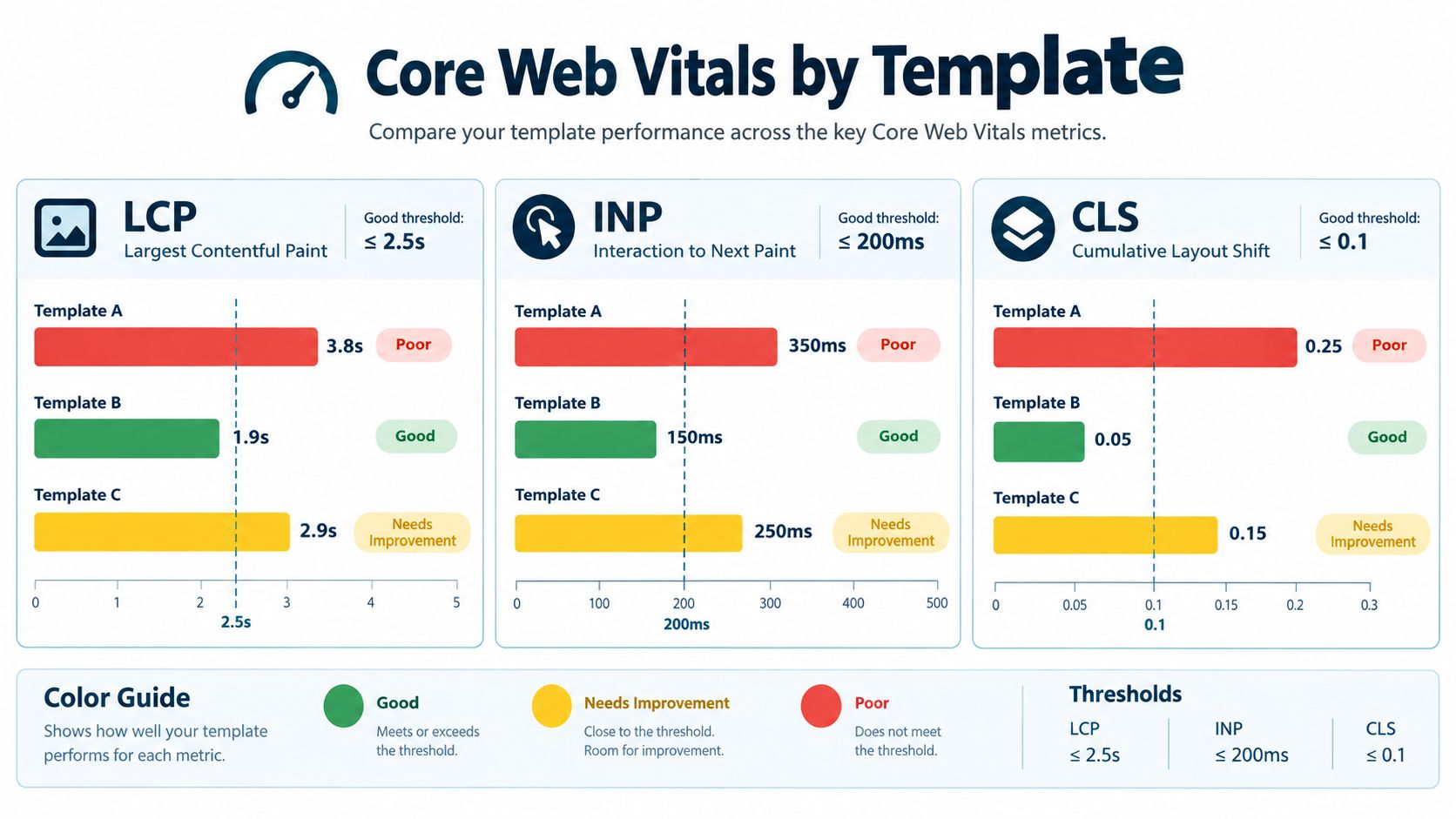
Group representative URLs by device, country, template, CMS route, and traffic tier. Run Lighthouse or comparable lab tests, then compare the findings with field data where available. Lab tests isolate conditions; real-user data shows how devices, connections, and user behavior affect the experience. HTTP Archive's 2025 performance data illustrates the uneven results across the web: 48% of mobile websites and 56% of desktop websites achieved a good result across all three Core Web Vitals HTTP Archive performance.
Google's “good” targets at the 75th percentile are LCP at 2.5 seconds or less, INP at 200 milliseconds or less, and CLS at 0.1 or less Core Web Vitals thresholds. Use these thresholds to classify issues, while still weighing the page's business role and traffic volume.
Trace the path from server to screen
After identifying slow templates, follow the critical rendering path from request to visible content. Review DNS and TLS timing, server response, HTML size, render-blocking CSS and JavaScript, font loading, image dimensions, lazy-loading behavior, third-party scripts, cache headers, compression, and CDN coverage.
The fix depends on where the delay starts. An ugly score in the wrong place tells you little. Address backend and TTFB problems before spending time on preloading. Set image and ad dimensions before repeatedly compressing media. If field data shows mobile users waiting for the main content, a strong lab result does not settle the issue.
Map the metric to the likely cause
- LCP problems commonly involve slow server response, oversized hero media, or render-blocking resources.
- INP problems often result from expensive JavaScript handlers or excessive client-side work.
- CLS problems usually involve unstable images, embeds, ads, or dynamically injected content.
A useful audit output connects each metric to a template, likely cause, affected journey, and business priority. That gives developers a fix list they can act on, rather than a general instruction to make the site faster.
Reconcile Crawled, Rendered, and Indexed Content
A crawler can discover a page that search engines still struggle to understand. That gap shows up most often on JavaScript-heavy templates, because crawling, rendering, and indexing are separate stages, not one neat pass through the site Google on JavaScript SEO.
Compare four versions of the same page
For critical templates, compare:
- View-source HTML
- Browser-rendered content
- Google URL Inspection output
- Googlebot requests in server logs
If content exists in the browser but not in the initial HTML, classify it by business impact. A donation form, event calendar, service description, or internal navigation path that disappears during rendering is not a minor quirk. It's a visibility issue with a practical cost.
Many small organizations get caught here. JavaScript-heavy CMS themes, client-side filters, and fancy navigation often work beautifully for users while leaving Google with a thinner version of the page than anyone expected. That's why a template-level rendering audit is more useful than a generic pass/fail crawl.
Rule of thumb: if the rendered navigation doesn't expose important URLs, or canonical, robots, and structured-data elements don't survive rendering, you don't have a styling issue, you have an indexing risk.
Decide when server rendering is worth the work
Server-side rendering is worth the development effort when the content is essential to discovery, indexation, or conversion, and when the client-rendered version is causing evidence-based gaps. Nonessential UI flourishes can stay client-rendered if they don't carry meaningful content or links. The point isn't to ban JavaScript, it's to keep the important stuff visible in the places Google uses.
If you want a practical analytics companion to this review, Bruce & Eddy's organic search tracking guide fits neatly with the log and inspection work. The point is to align what the site emits with what search traffic later reflects, because a clean render chain should show up in the data.
Audit Structured Data, Mobile Parity, and Security Together
These checks belong in the same pass because they all depend on usable HTML and a page that behaves consistently for search engines and people. Structured data helps search engines understand meaning, mobile parity makes sure the indexed version isn't missing core content, and security keeps the delivery path trustworthy enough to crawl without drama.

Validate the markup and the mobile version
Start with structured data. Confirm the schema is present, parses correctly, and survives rendering, then check whether the page qualifies for the rich result you want. If the markup breaks after JavaScript runs, the page can look fine to users while search engines lose the signal.
Then compare mobile and desktop versions for identical primary content, titles, meta descriptions, canonical tags, structured data, internal links, images, and robots directives. Google uses the mobile version for indexing and ranking, so missing mobile content can become an indexing problem even when the desktop site looks complete Google's mobile-first update background.
Treat accessibility as part of technical SEO
Accessibility and SEO share more plumbing than many admit. The 2025 Web Almanac reported that the median Lighthouse Accessibility score improved only about 1% year over year, reaching above 85%, and it also notes that lab results and real-user data don't behave the same way HTTP Archive accessibility. That's why missing labels, weak heading structure, keyboard-inaccessible navigation, and image alternatives deserve attention in the same audit.
For churches, nonprofits, and SMBs, I'd rank those issues by search visibility, user exclusion, legal or reputational risk, and donation or revenue impact, not by whatever color the tool happened to use that day. A site can be “green” and still be frustrating enough to lose real people.
Check security and access as a final trust layer
Make sure the site is fully available over HTTPS, watch for mixed content, and confirm Googlebot can access the important templates. If security or access controls interfere with crawling, the rest of the audit starts from a weakened position. That's not dramatic, it's just how the stack works.
For schema-specific implementation review, Bruce & Eddy's structured data guide is a sensible companion if the markup side is where things keep breaking.
Turn Findings Into a Prioritized Remediation Plan
A good audit ends with a decision document, not a pile of screenshots. It should identify what to fix first, what can wait, and what evidence will confirm the fix after deployment. The strongest plans reconcile crawler findings, Google's fetched and rendered output, and the experience users have on important pages.
Score issues by business impact and dependency order
Use three buckets:
- Critical, blocking crawling, indexing, or access to a high-value template.
- Important, reducing performance, rendering quality, or trust on valuable pages.
- Monitor, worth tracking without derailing the current sprint.
Rank each finding by affected organic demand, crawl frequency, revenue or donation importance, and implementation risk. Then sequence work by dependency. Backend and TTFB improvements should precede preloading changes. Correct image dimensions before tuning compression. Resolve rendering problems before changing noindex or canonical signals, because those signals may describe the wrong output.
Assign an owner and a verification method to every meaningful fix. After deployment, inspect the specific issue in Google Search Console, compare field performance, or test the rendered output again. A URL inspection result may look healthy while a user still encounters missing content, slow interaction, or a broken template. Verification should cover all three views: what a crawler discovers, what Google can fetch and render, and what the user receives.
Use the audit to decide whether maintenance is enough
Some sites need recurring maintenance. Others have a platform, theme, or template architecture that keeps recreating the same crawl, rendering, or content problems. If reasonable fixes fail to hold, compare the cost of continued patches with a rebuild or platform change. The right decision depends on business impact, implementation risk, and the value of the affected templates.
A practical checklist can support the next review. Use the Bruce & Eddy website audit checklist against your highest-value templates, including pages that tools rarely test thoroughly. For schema implementation issues, the Bruce & Eddy structured data guide offers a focused reference.
A technical SEO review is complete when findings become owned work, priorities reflect business consequences, and post-release checks show whether the change solved the original problem. Bruce & Eddy can provide technical SEO reviews, maintenance support, and web work for teams that need help turning audit findings into an actionable fix plan. Visit Bruce and Eddy for more information.
