

A closer business doesn't automatically win a local search. Google can rank a slightly farther competitor ahead of you when that competitor matches the search better, which is why knowing how to improve local SEO rankings starts with what you can actually control. Distance is mostly fixed. Relevance and prominence aren't, and that's where most of the useful work lives.
Where to Start and Why the Profile Comes First
Local SEO works best when you tackle the factors you can influence in order. Google's guidance on local ranking identifies relevance, distance and prominence. Relevance is how well your Business Profile matches a search. Distance is how far your business is from the searcher or the location named in the query. Prominence reflects how well known your business is; Google says links, articles, directories, review volume and review scores can contribute.
Distance is largely outside your control, so start with the information customers and search engines can assess. Describe your services using clear, accurate language, then make sure your business details match across listings. Build credible local mentions and ask customers for honest reviews as ongoing work. For a step-by-step walkthrough, read this guide to getting a Google Business listing and compare its fields with your own listing before making changes.
Local SEO Tasks in Priority Order
| Priority | Task | Factor it supports | How to verify it is done |
|---|---|---|---|
| 1 | Claim, verify and complete the Google Business Profile | Relevance and prominence | The profile shows verified status and its relevant fields are complete |
| 2 | Align name, address and phone across listings | Prominence | Top directories show identical details |
| 3 | Publish location and service pages with structured data | Relevance | Rich Results Test reports no critical errors |
| 4 | Start a steady review request routine | Prominence | Log review count, recency and reply rate each month |
| 5 | Earn local mentions and links from real partners | Prominence | Referring pages come from local organizations you work with |
| 6 | Fix mobile speed and tap-to-call problems | Conversion after the click | Check PageSpeed Insights field data on key pages |
The order helps a small team focus its effort. First confirm that the profile is complete and the business details agree across listings. You can work on those checks together, then address the website, review routine, local mentions and mobile experience. Keep the verification checks practical: compare the details directly, review the referring pages, and use the named testing tools for structured data and page performance.
How to Optimize Your Google Business Profile
The profile comes first because, in 2023, Google Business Profile signals accounted for 32% of the ranking influence for Google's local pack in Whitespark's survey of 44 local SEO practitioners. There's also room to stand out. In 2025, BrightLocal's SMB marketing research found only 35% of small and medium-sized businesses surveyed reported having a Google Business Profile at all.
The five core steps below show the sequence most businesses should follow.
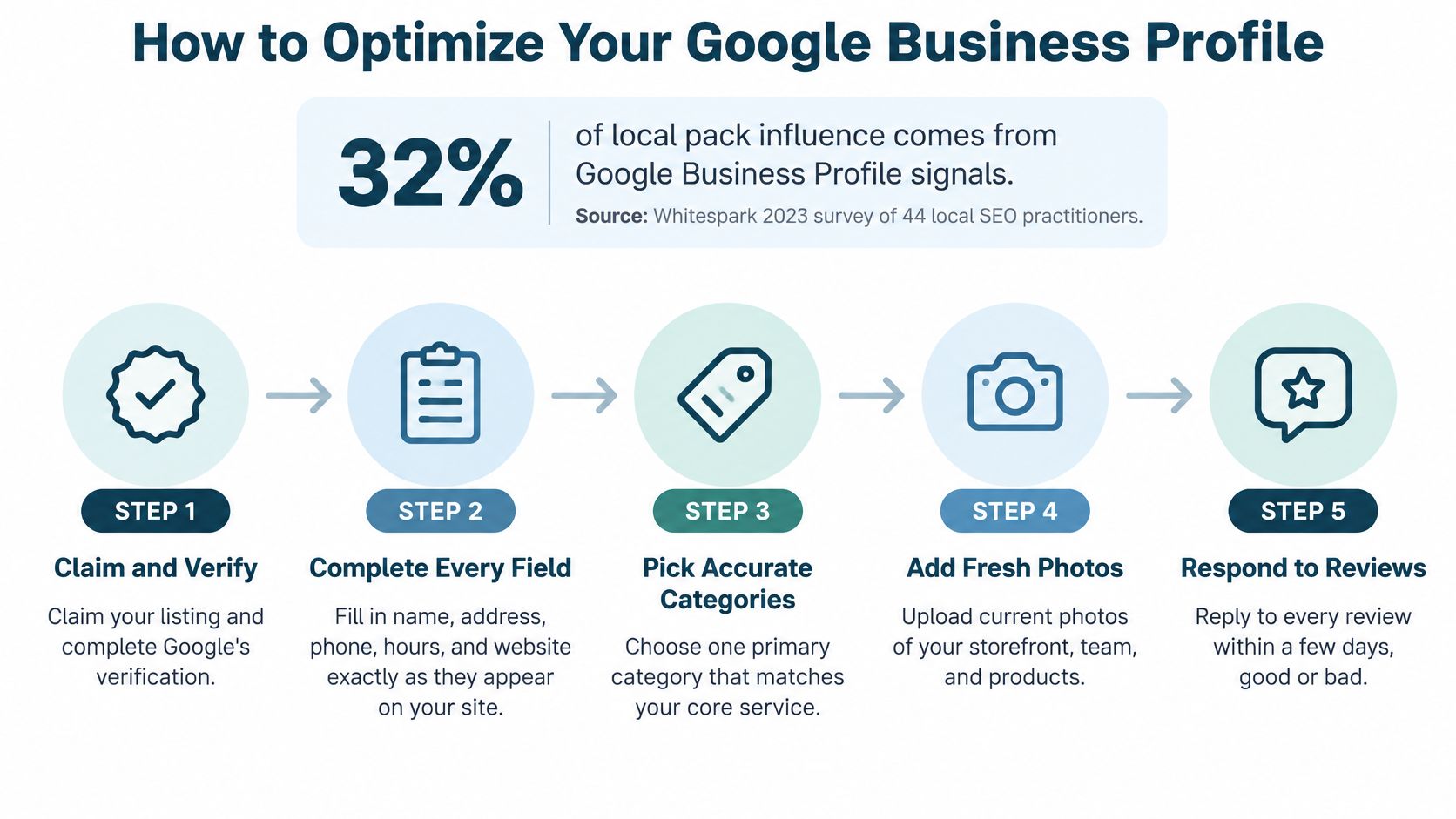
Claim It and Fill Every Field Accurately
- Claim and verify the profile. An unverified listing can't be trusted to represent your real business, and you can't fully control it.
- Use your exact business name as it appears on your registration or website. Don't add keywords or location phrases, since stuffed names can violate Google's guidelines.
- Choose one primary category that matches your core service. Add secondary categories only for real offerings, not services you'd like to be found for someday.
- Write services in customer language. Say a martial arts school lists beginner classes clearly. Someone using a directory to find nearby BJJ academies searches for that plain phrase, not for a vague label like fitness solutions.
The video below walks through the profile interface if you'd rather see the fields before you edit them.
Keep Hours Photos and Answers Current
- Enter regular and holiday hours, and set your service area accurately if you travel to clients instead of serving them on site.
- Upload real photos of the work, the location, and the team. Replace them when staff, signage, or the space changes.
- Post updates and answer Q&A yourself so the first public answer is accurate instead of guessed by a stranger.
- Check the profile on a phone and a desktop. Details that look fine in the editor sometimes display poorly where customers read them.
For a field by field reference, this guide to what should be optimized on your Google Business Profile breaks down each element in more depth.
The most common profile problem isn't a missing profile. It's a complete one left stale after a move or a new phone number.
Build Citations and Local Links That Agree
Citations are places outside your own site that repeat your business details, from general directories to industry listings. The goal is agreement, not volume. A hundred listings with three different phone numbers help less than twenty listings that all say the same thing.
Business Details That Must Match Everywhere
| Business detail | Must match across | Common drift |
|---|---|---|
| Legal business name | Profile, website, directories, invoices | Added keywords, or Inc or LLC dropped on some listings |
| Street address | Profile, website footer, directories | Suite written as Ste on some sites, or unit number missing |
| Local phone number | Profile, website header, listings | Call-tracking number showing on some pages only |
| Website URL | Profile and directories | Old domain or http version still listed |
| Primary category | Profile and service pages | Profile names one service while the site emphasizes another |
| Business hours | Profile, website and structured data | Holiday hours updated on one platform only |
Audit What Already Exists Before Adding More
Search your business name plus your phone number, note every listing that appears, and log each mismatch and duplicate. Fix the sources that matter most first, which means your profile, your website footer and contact page, and the directories where customers really look. For a repair shop, that might be a listing like the Pennsylvania iPhone repair directory. For churches and nonprofits, denominational, network, or community directories often matter more than generic ones.
Merge or correct duplicates instead of creating new listings, since a fresh listing alongside an old one splits your details further. A call-tracking number on one page and your main number everywhere else counts as a mismatch, so either use the tracking number consistently or don't use it on listings at all. This explanation of what local citations are covers how Google uses these repeated details to confirm a business exists where it claims to.
Local links work differently. They're mentions earned from chambers of commerce, trade associations, sponsors, local news, vendors, and partner organizations, and they come from real participation, events, and partnerships. I'd skip paid link packages and reciprocal link schemes. They carry risk, and the sites involved rarely send you a real customer.
Keep one sheet listing each directory, who manages the account, and the date it was last checked. When you move or change numbers, that sheet becomes your update checklist instead of a scavenger hunt.
Match Your Website Pages and Schema to Your Listing
Structured data describes what a page already says, so the markup has to match the visible text. If your page lists one phone number and your schema lists another, you've created the same disagreement you just cleaned up in your citations.
The photo below shows the unglamorous part of this work, comparing documents and page details side by side before anything goes live.

Build Pages for Places You Actually Serve
Create one page for each real location and each core service, with details a visitor could verify, such as the address, hours, team members at that location, and work done nearby. Don't build a town page for every place you could theoretically reach. Thin pages for areas you don't serve add noise and read as filler to anyone who lands on them.
Add and Validate LocalBusiness Markup
Google's LocalBusiness structured data documentation identifies business hours, departments, and other business details that websites can communicate to Google through structured data. Work through the sequence in order.
- Add LocalBusiness properties for name, address, telephone, opening hours, and URL, using the same values as your profile.
- Follow Google's structured data guidelines for each property you include, rather than copying a template blindly.
- Validate with the Rich Results Test before you publish.
- Fix any critical errors the test reports. Warnings can wait, critical errors can't.
- Test the live URL with the URL Inspection tool after deployment to confirm Google sees what you published.
- Confirm the pages aren't blocked by robots.txt, a noindex directive, or a login requirement.
- Submit an updated sitemap so Google can find the changes without waiting on a routine crawl.
If you're new to the concepts behind the code, this overview of structured data for SEO explains the major types and where each one belongs.
Valid markup makes your details clear to machines. It doesn't guarantee rich results or a ranking change, and anyone who promises otherwise is guessing.
Earn Reviews Through a Routine Google Allows
Start with the boundary. Google's Business Profile content policy prohibits offering free or discounted goods or services in exchange for reviews, asking customers to alter reviews, or asking them to remove negative reviews. Google classifies those practices as fake and misleading content. Reviews have to represent genuine experiences, so the routine below is built to stay inside that line.
A Simple Routine That Stays Compliant
- Send a direct review link within 24 to 72 hours after completed work, while the experience is still fresh enough to describe accurately. Waiting two weeks gets you vague reviews or none at all.
- Ask once, plainly. Request an honest account of the experience. Don't hand customers a script, and don't ask them to repeat a keyword phrase. Identical wording across reviews looks manufactured because it is.
- Reply to every review, positive and negative, with specific detail about what was mentioned. Protect confidential information by never confirming a customer's relationship with you or discussing their situation in the reply. That's especially important for nonprofits, churches, counselors, and anyone serving people in sensitive circumstances.
- Log recurring themes. Repeated comments about slow scheduling or unclear pricing point at a service or a page that needs fixing. Fix the cause and the reviews usually change on their own.
Why Replies Matter More Than You Think
BrightLocal's 2025 Local Consumer Review Survey found 89% of consumers were more likely to use a business that responds to all reviews, while 56% were more hesitant to use a business that didn't respond. Google also notes that an honest mix of positive and negative feedback can appear more trustworthy to potential customers. A few critical reviews with thoughtful, specific replies aren't a problem to hide. They show a real business paying attention.
Avoid review gating, where you screen customers and only send happy ones to Google. Avoid rewards, bulk review spikes from a sudden campaign, and asking everyone to repeat the same marketing phrase. Each of these undermines authenticity and can conflict with platform policy.
Practical rule: treat reviews as quality control first and a ranking input second. Complaints often name the exact service problem you most need to fix.
Track review activity monthly alongside calls and direction requests, which the final section covers as part of one combined check.
Fix Mobile and Speed Problems Before They Cost Calls
Speed doesn't pick the map pack by itself. What it does is decide whether someone who found you through local search stays long enough to tap the call button. A slow or jumpy page loses that person to the next listing, which is probably your competitor.
Core Web Vitals Thresholds for Local Landing Pages
| Metric | What a phone visitor notices |
|---|---|
| Largest Contentful Paint (LCP) | How long the main content takes to appear |
| Interaction to Next Paint (INP) | How quickly the page responds after a tap |
| Cumulative Layout Shift (CLS) | How much content jumps around while loading |
Run PageSpeed Insights on your homepage, your top service page, your contact page, and each location page. Read the field data from real visitors before the lab score, because field data shows what your customers experience on their phones and connections. For background on fixing each metric, this guide to how to improve Core Web Vitals walks through the common causes in plain language.
Then test the page the way a customer uses it. On your own phone, tap the call button, open the map link, and submit the contact form. Confirm the address and hours are visible without scrolling far, and check that nothing shifts position while you're trying to tap it.
Work through the usual causes in order. Oversized hero images are the most common offender on small business sites. Next come too many scripts loaded by plugins or third party tools, then fonts or banners that shift the layout as the page loads. A fix on one shared template often improves every page built from it, so I'd start with shared components like the header and hero before tuning individual pages.
Run Your First Monthly Local Check
There's a newer visibility check most businesses haven't added yet. Yext's 2026 consumer search behavior report found 42.7% of global respondents had used an AI tool for local search in the previous month. After an AI recommendation, 53% verified the result on Google or Bing, 49% visited the business website, and 42% clicked the cited sources. AI may create the first mention, but people still check search results and your site before they contact you.
Treat AI visibility as its own measurement. Pick a fixed set of prompts for your real services and locations, run them monthly, and record whether your business is named accurately and which sources get cited. Wrong details in an AI answer usually trace back to inconsistent details somewhere public, which sends you back to your citations sheet.
Local KPIs and Where to Read Them
| Metric | Where to find it | What it tells you |
|---|---|---|
| Profile calls | Google Business Profile performance data | Whether the listing drives phone contact |
| Direction requests | Google Business Profile performance data | Whether map visibility leads to visits |
| Website clicks from the profile | Google Business Profile performance data | Whether the listing sends people to your pages |
| Review count and recency | Review platform | Whether recent feedback is still arriving |
| Rating spread and reply rate | Review platform | Whether feedback is balanced and answered |
| Branded search queries | Google Search Console | Whether people search your name after seeing you |
| Map pack position for core services | Manual checks by service and area | Whether rankings move in the areas you serve |
| AI answer accuracy | Manual prompt tests, recorded monthly | Whether AI names your business correctly and which sources it cites |
Read calls, direction requests, and website clicks against the dates you made changes, not as proof that one action caused a ranking shift. Don't credit reviews alone for any movement, since several things usually change in the same month.
The monthly routine itself is short. Export your profile metrics, read the review log, rerun your prompt set, record map pack positions for core services by area, and write down one change to test next. If the website side is where the work keeps stalling, whether that's page structure, schema, or speed fixes, that's a reasonable point to get help with the technical pieces.
Bruce & Eddy helps small businesses, churches, and nonprofits with the website side of local visibility, including page structure, structured data, speed fixes, and the ongoing maintenance that keeps business details accurate. If your monthly check keeps surfacing site problems you'd rather not untangle alone, visit Bruce and Eddy to see how we work and start a conversation.
