

A page can look finished and still respond poorly. Google classifies an Interaction to Next Paint result above 500 milliseconds as poor, according to its Core Web Vitals report documentation. That's why front-end web development isn't just making a website look right. It's making the part visitors use respond reliably.
For a business owner, the decisions behind that experience become ongoing costs: code someone must update, forms someone must test, and third-party tools someone must keep under control. A good front end meets the business requirement without creating unnecessary upkeep. A good agreement names who owns it after launch.
The Front-End Stack Layer by Layer
Front-end web development builds the interface visitors see and use in their browser. It includes the page structure, visual presentation, interactive behavior, and delivery work that makes those pieces available.
The layers answer different questions. HTML describes what the content means. CSS determines how it appears. JavaScript handles changes and interactions that the page can't accomplish with markup and styling alone.
This diagram shows how the browser brings those foundations together.
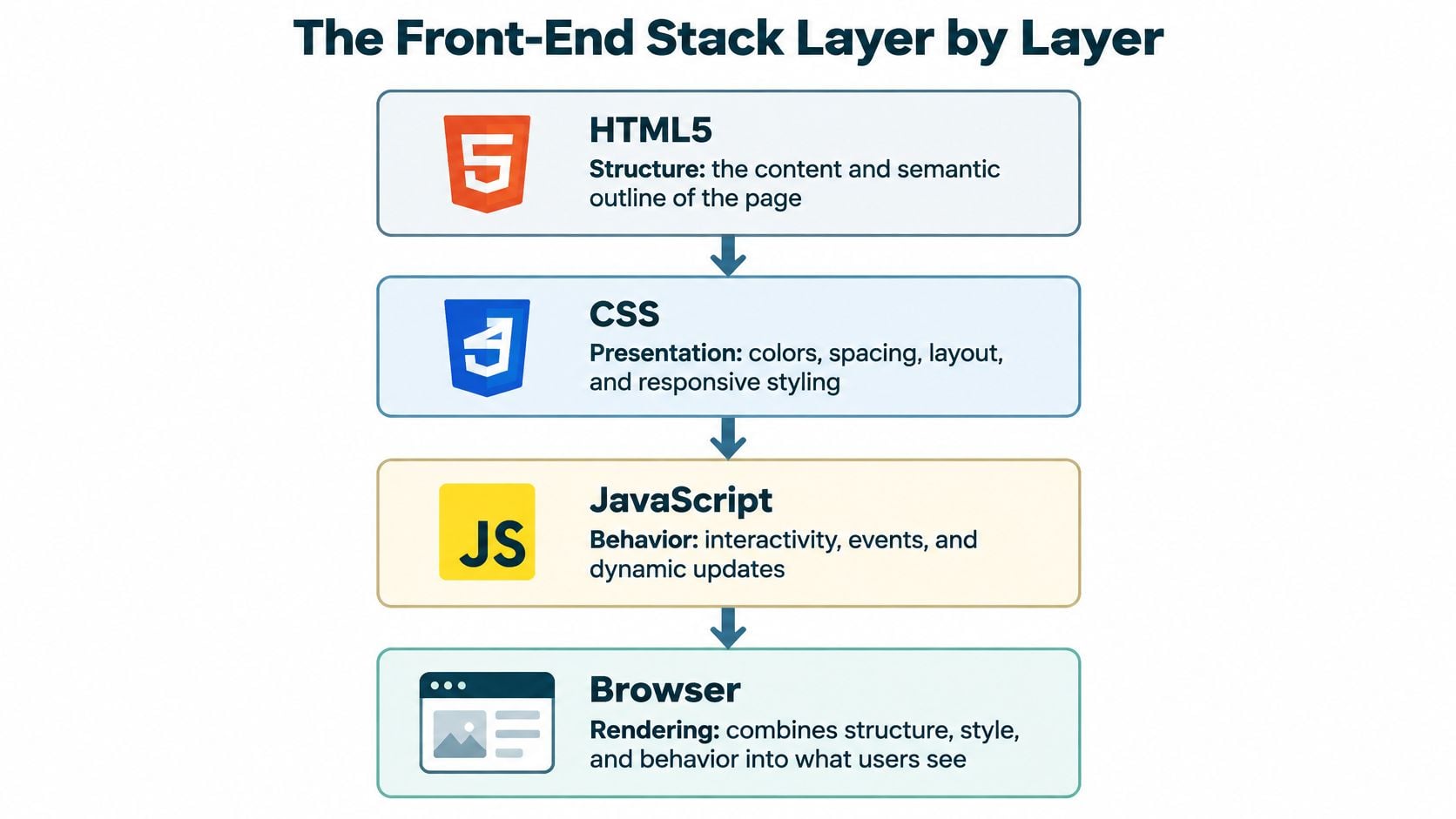
Structure, Presentation and Behavior
HTML supplies headings, paragraphs, links, images, and form fields. Choosing the correct element matters: a button performs an action, while a link takes someone somewhere. Making either one look clickable doesn't automatically give it the correct behavior.
CSS controls spacing, typography, colors, and layouts that adapt to available space. Sass helps developers organize styles, while Tailwind CSS provides utility classes. Neither replaces the need to test long headings, narrow screens, or enlarged text.
JavaScript powers things such as menu toggles, cart updates, and form feedback. TypeScript adds development-time checks to JavaScript code. It can help catch mistakes, but it doesn't prove a checkout works for a customer.
Reuse and Delivery Create Their Own Responsibilities
Components combine structure, presentation, and behavior into reusable pieces. A shared navigation component lets a developer update navigation consistently. React, Vue, and Svelte help organize that work, particularly when an interface has interconnected states.
Build tools prepare source files for delivery. Vite and webpack can process scripts and styles; Astro also provides an architecture for assembling pages. Image handling, compression, and asset organization belong in this conversation, not in a cleanup phase after launch.
Accessibility and testing cross every layer. They aren't finishing touches that can safely be assigned to whoever has time.
Front-end code runs in the browser and shapes what visitors see, while the back end handles servers, databases, and the logic behind forms and accounts.
Front-end layers, what they do and common tools
| Layer | What it controls | Common tools | Business effect when weak |
|---|---|---|---|
| Structure | Content, headings, forms and meaning | HTML5 | Search engines and assistive tech misread the page |
| Presentation | Layout, color, type and responsive behavior | CSS, Sass, Tailwind CSS | Pages break on phones and brand feels inconsistent |
| Behavior | Menus, validation, dynamic updates | JavaScript, TypeScript | Forms fail and interactions lag |
| Components | Reusable blocks like cards, carts and navigation | React, Vue, Svelte | Every change takes longer across many pages |
| Build and delivery | Bundling, compression, image handling | Vite, webpack, Astro | Slow loads and higher hosting use |
| Accessibility and testing | Keyboard use, contrast, screen reader support | axe, Lighthouse, manual testing | Excluded visitors and compliance risk |
Use this map to describe a problem accurately. A misplaced button may need CSS work; a submission that never reaches your staff may require back-end investigation. The person maintaining the site should identify the failing layer before recommending a rebuild.
How a Browser Turns Your Code Into a Page
When someone opens a service page, the browser doesn't receive a finished picture. It receives instructions and resources, then assembles the result.
A developer can compare those instructions with the browser's output side by side.
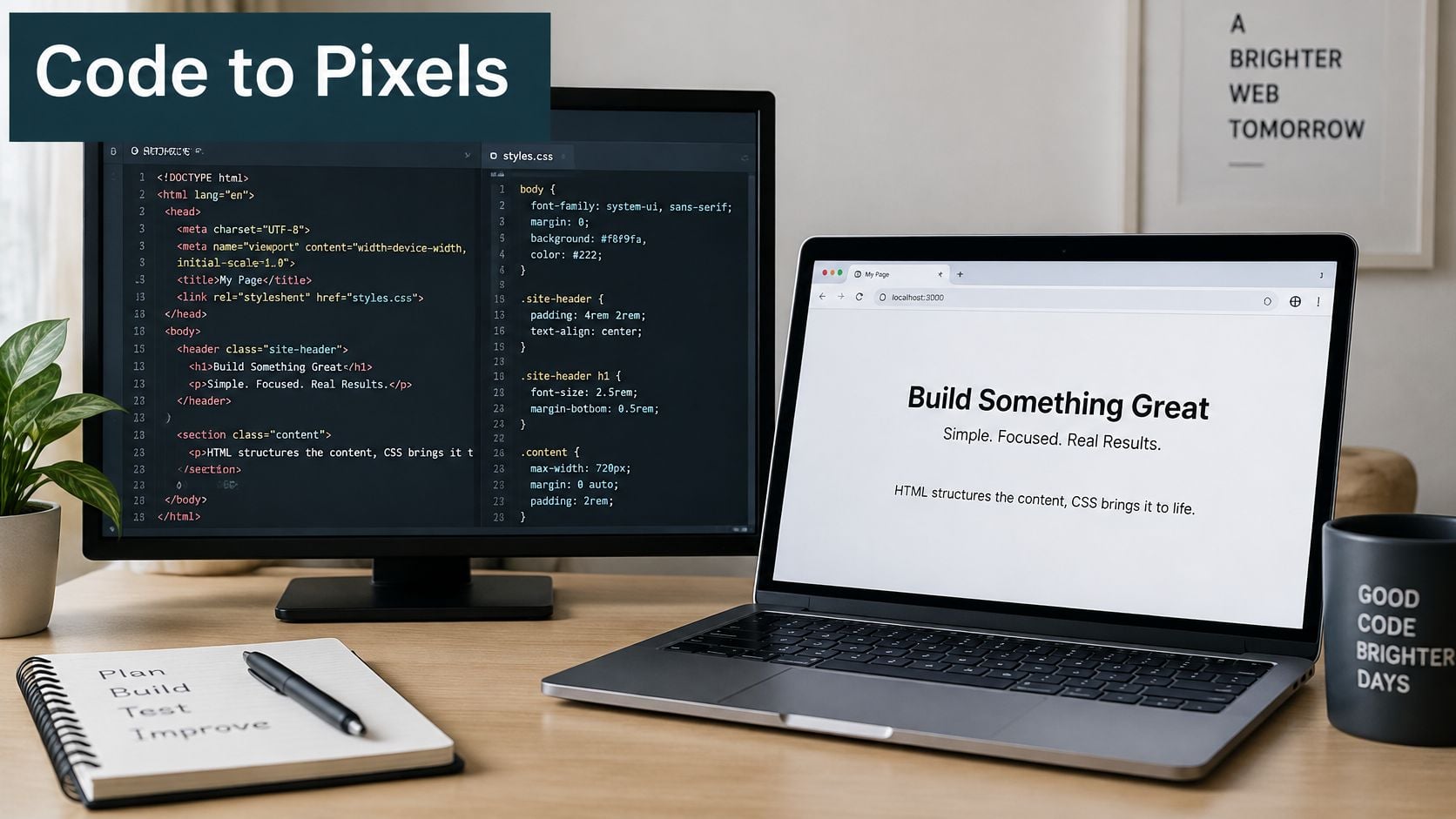
From Instructions to Pixels
The browser reads HTML and builds the Document Object Model, or DOM, an organized representation of the page. It reads CSS, calculates styles, and combines the relevant information into a render tree. Then it calculates the positions and sizes of boxes and paints the screen.
A useful analogy is that HTML supplies the floor plan, CSS supplies the finish and layout, and JavaScript supplies the wiring that makes the switches work. The analogy has limits, though: scripts can also move the walls by adding or changing page elements.
JavaScript can interrupt rendering or occupy the main thread needed for interaction. A visitor may see a complete form while the browser is still too busy to respond promptly. The developer needs to inspect what executes, not just what downloads.
HTML5 became a W3C Recommendation on October 28, 2014, establishing shared native capabilities including audio, video, canvas, and SVG, as documented in the W3C's HTML5 history. Standards-based implementation reduces the need for separate browser workarounds, which helps keep maintenance predictable.
For a visual companion to the rendering explanation, this video is available.
Check the Result, Not Just the Preferred Browser
Browser coverage should reflect your visitors and essential tasks. The 99tests guidance can help you plan browser coverage by market share, alongside your own analytics and customer requirements.
Try these quick checks:
- Disable JavaScript temporarily: Reload a public content page through your browser's developer tools. Essential copy and navigation should ideally remain available, although application features may reasonably require scripts.
- Narrow the window: Check whether navigation, headings, and forms remain usable at phone width. Look for horizontal scrolling and clipped controls.
These are warning checks, not certification. Assign browser compatibility to the developer maintaining the interface, with an agreed list of supported browsers and critical tasks.
Frameworks, Platforms and Plain Code Compared
Choose the lightest approach that meets the actual requirement. A brochure website and a scheduling application don't need the same architecture, even if their home pages look similar.
Plain HTML, CSS, and JavaScript can be a strong choice for a small, stable site. The tradeoff appears when someone must repeat edits across pages. Templates can reduce that repetition without requiring a full browser application.
A CMS or managed platform makes more sense when staff publish regularly. WordPress, Squarespace, and Wix offer different editing and extension models, but the business decision is similar: who needs to change content, and how much control do they need?
Front-end approaches compared by fit and upkeep
| Approach | Good fit when | Main tradeoff | Ongoing cost |
|---|---|---|---|
| Plain HTML, CSS and JavaScript | Brochure site with few interactions | Repeated work grows with each page | Low, but edits stay manual |
| WordPress, Squarespace or Wix theme | Content-led site where editors publish often | Theme and plugin updates add surface area | Platform plan and regular updates |
| Component framework such as React, Vue or Svelte | Dashboards, booking tools, interactive apps | Client-side JavaScript adds weight | Developer time for upkeep |
| Meta-framework such as Next.js, Nuxt or Astro | Content plus app features needing server rendering | More moving parts to host and tune | Hosting setup and framework upgrades |
| Custom build on a shared design system | Several sites or brands that must match | Heavier planning up front | Documentation and governance |
The upkeep column describes responsibilities, not a price quote. Managed platforms handle their underlying software updates differently from a self-hosted CMS, where plugin and theme compatibility need explicit ownership.
When More Architecture Earns Its Keep
React, Vue, or Svelte can help with a dashboard where filters, permissions, and live results affect one another. They're harder to justify merely to animate a service page.
Next.js, Nuxt, and Astro offer different ways to combine generated or server-rendered pages with interactive features. They aren't interchangeable, and selecting one doesn't mean every page needs a continuously running application server.
A shared design system becomes worthwhile when several sites must follow common rules. Someone still needs authority to approve component changes and exceptions. Otherwise, the business pays for shared infrastructure while teams continue building separate versions.
JavaScript Has an Operating Cost
The 2025 Web Almanac's page-weight chapter reported 708 KB of JavaScript on the median desktop page, alongside 280 KB of uncompressed, unused JavaScript on the median desktop page. Those are different measurements, so don't subtract one from the other to estimate savings.
Unused features, duplicate libraries, and globally loaded widgets deserve inspection. Removing code requires testing because a feature may be used only during a particular interaction.
Practical rule: Add a framework because the interface needs it, not because the proposal sounds more current with it.
Before approving the architecture, ask: Who will update this in two years? A sensible answer names the responsible developer, the dependencies they maintain, and how another person could take over.
Page Weight and Core Web Vitals Budget
The 2025 Web Almanac's performance chapter put the median home page at 2.86 MB on desktop and 2.56 MB on mobile, with images representing 1,059 KB and JavaScript 697 KB on home pages. It also reported a median of eight CSS requests, with 98.1% of pages requesting a JavaScript file.
These figures describe the surveyed web, not an acceptable budget for your website. A contact page doesn't earn permission to be heavy because other pages are heavy.
The resource breakdown makes the main inspection areas clear.
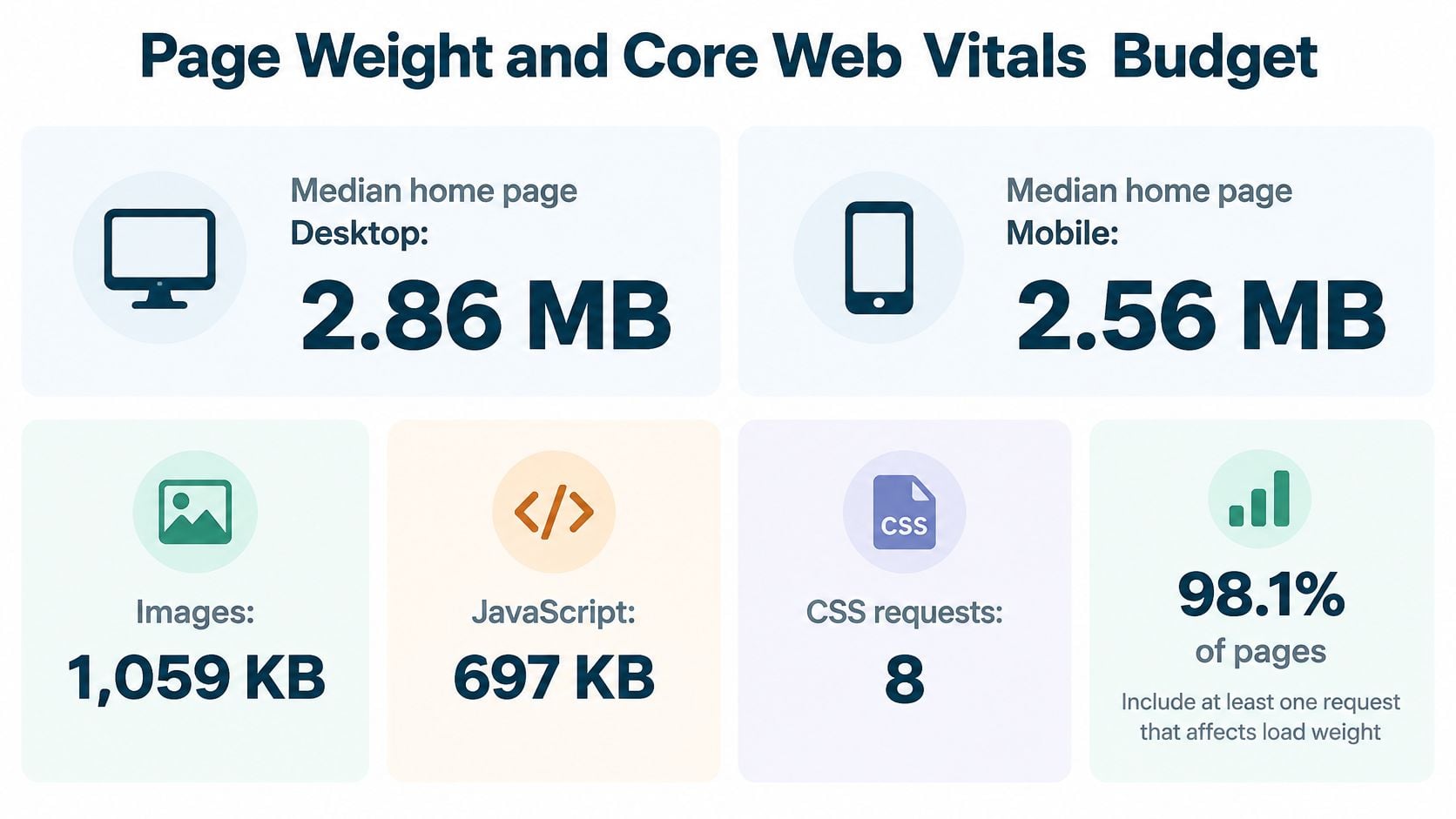
Budget for Loading, Interaction and Movement Separately
Page weight measures transferred resources. Core Web Vitals measure aspects of the resulting experience. A lightweight page can still have a slow server, and a page that appears quickly can still have sluggish controls.
Google's Core Web Vitals threshold definitions evaluate the 75th percentile of page loads, separated by mobile and desktop, with the good, needs-improvement, and poor bands shown below.
Core Web Vitals thresholds and the fixes that move them
| Metric | Good | Needs improvement | Poor | Usual front-end fix |
|---|---|---|---|---|
| Largest Contentful Paint (LCP) | 2.5 s or less | Above 2.5 s to 4 s | Above 4 s | Faster server response, prioritized hero image, fewer render-blocking files |
| Interaction to Next Paint (INP) | 200 ms or less | Above 200 ms to 500 ms | Above 500 ms | Split long tasks, defer noncritical scripts, lighten event handlers |
| Cumulative Layout Shift (CLS) | 0.1 or less | Above 0.1 to 0.25 | Above 0.25 | Reserve image and embed dimensions, avoid late-inserted banners |
For LCP, find the largest visible content element and determine what delays it. If it's the hero image, serve an appropriately sized version and make sure the browser can discover it promptly. Don't lazy-load the image the visitor needs immediately.
For INP, inspect what happens when someone taps a menu, chooses a filter, or submits a form. Splitting a download won't fix an expensive event handler by itself. The developer must reduce or reorganize the work performed during the interaction.
For CLS, reserve space before images, videos, and external content arrive. A banner inserted above the form can move the submit button just as someone tries to select it. That's a usability defect, not merely an untidy animation.
Set a Budget by Page Type
Start with representative pages rather than a single homepage score. A service page, product listing, checkout, and account dashboard have different requirements.
Have the developer record:
- Transferred resources: Measure images, scripts, fonts, and styles separately, using a consistent test configuration.
- Interaction work: Test the actual menu, form, filter, or cart action instead of stopping when the page appears.
- External dependencies: Record each third-party script's purpose, business owner, loading condition, and removal plan.
- Acceptance criteria: Agree on page-specific asset limits and experience targets before adding features.
There isn't a universal file-size allowance that fits every project. Establish a working baseline, remove obvious waste, and make additions compete for a justified share of the budget.
A script that's easy to install can still be expensive to keep. Someone needs to own the reason it loads.
Apply the Budget to a Contact Page
Consider a hypothetical contact page with a large hero image, a chat widget, and an analytics tag. Open the browser's Network panel, reload with caching disabled, and total the transferred resources by type. Keep transferred size separate from decoded size and execution time.
Question the chat widget first, not because chat is always wrong, but because it adds an external dependency to a page that already provides a contact method. Does someone staff it? Does it help visitors complete a task? Could it load only when someone opens it?
Next, inspect the hero image. Crop it to the intended use, provide responsive sizes, and choose an efficient format. An oversized decorative image shouldn't delay the page's contact information.
Treat analytics deliberately too. Keep the measurement the business uses, remove abandoned tags, and check whether multiple integrations load the same service. Don't remove necessary consent behavior just to improve a test result.
Give Performance an Owner After Launch
Use Search Console's Core Web Vitals report and available field data in PageSpeed Insights to understand visitor experience. Use Lighthouse and browser performance traces to diagnose causes. A lab result is useful evidence, but it doesn't replace real-user measurements.
A pre-release test can identify likely regressions; field measurements take time to reflect deployed changes. If traffic is insufficient for page-level field reporting, document that limitation rather than presenting a synthetic score as proof of a field pass.
Maintain a monthly issue log for pages entering needs-improvement, including the affected template, likely cause, responsible person, and next action. Our guide to improving Core Web Vitals provides a focused starting point for that work.
The business owner approves the tradeoff. The developer investigates the cause. Marketing should own the justification for marketing scripts, rather than leaving developers to guess which ones still matter.
Accessibility Rules Built Into Front-End Code
WCAG 2.2 front-end requirements and where they live in code
| Requirement | Rule | Where it shows up in code |
|---|---|---|
| Text contrast | 4.5:1 for normal text, 3:1 for large text | Color tokens in the design system |
| Keyboard operation | All functions usable without a pointer, apart from applicable inherent-function exceptions | Custom menus, dialogs, sliders, carousels |
| Visible focus | Enhanced focus appearance at AAA includes a 2 CSS px perimeter-equivalent area and 3:1 contrast between states | Focus styles in the stylesheet |
| Pointer target size | At least 24 by 24 CSS px, subject to listed exceptions | Buttons, icons, form controls |
| Single-pointer alternative | Multipoint or path gestures need a single-pointer alternative; dragging needs an alternative without dragging, subject to exceptions | Maps, sliders, drag-and-drop interfaces |
| Text alternatives | Non-text content has an appropriate text equivalent, with decorative content handled accordingly | Image alt attributes and icon labels |
The contrast and enhanced focus measurements above come from the WCAG 2.2 guidelines. The target-size and interaction requirements belong to the broader WCAG 2.2 Recommendation, which organizes accessibility around content being perceivable, operable, understandable, and resilient.
Level AA means meeting the applicable Level A and AA criteria, not collecting a general accessibility score. The enhanced focus-appearance dimensions in the table are a higher-level requirement, not a blanket AA requirement. WCAG conformance also isn't a universal statement of legal compliance.
Assign the Rules to the Right People
The designer should define readable color combinations and clear focus styles. The developer should preserve those rules in reusable tokens and components. Contrast needs checking in error messages, disabled-looking states, and text over images, not just the main paragraph color.
Keyboard behavior belongs in the implementation. Use real buttons and links, manage focus when dialogs open and close, and avoid controls that require hovering. A visible focus indicator tells someone where their next keyboard action will happen.
Pointer targets and gesture alternatives require design and development cooperation. Give compact icons sufficient selectable space. Provide controls for moving an item rather than requiring a drag, and don't assume a path-based gesture works for every visitor.
Content editors own meaningful image descriptions and clear field instructions, with developer support for accessible markup. Placeholder text isn't a substitute for a persistent form label. An icon-only button needs an accessible name that explains its action.
Test the Task, Not Just the Template
Automated tools such as axe can identify rule failures, but they can't establish that someone can complete a donation or appointment booking. Combine scans with keyboard and screen-reader testing on the actual flow, including errors and confirmation messages.
Try this short check on your main form:
- Use the keyboard: Tab through controls and confirm the order makes sense and focus remains visible.
- Enlarge the page: Zoom substantially, then look for clipped instructions or overlapping fields.
- Inspect labels: Confirm every field has a visible label and errors explain how to proceed.
- Finish the task: Submit test information safely and check the confirmation.
Use our website accessibility improvement guide to turn findings into assigned fixes. A shared form component is usually a better starting point than scattered cosmetic adjustments.
How Front-End Decisions Shape Search Visibility
Front-end choices influence whether search engines can discover and interpret content. They can't promise rankings. A technically tidy page still needs useful information that matches what someone is looking for.
The practical concern is dependency. If important service copy appears only after scripts execute and fetch additional content, the page has more opportunities for rendering failures. Delivering essential public content in the initial HTML reduces that dependency.
Make Important Content Inspectable
Ask the developer to demonstrate how a public page exposes its heading, body copy, and internal links. Don't accept a screenshot as evidence that the underlying content is available.
Semantic headings organize the subject. Descriptive links explain destinations. Structured data, when appropriate, should describe the content visitors can see, not a more impressive version of the business.
Use this inspection checklist:
- Check page source: Look for essential headings and body text in the initial HTML. Their absence signals a JavaScript dependency, not automatic exclusion from search.
- Inspect navigation: Confirm internal destinations use standard anchor elements with valid
hrefattributes, rather than click handlers alone. - Compare rendered output: Use URL Inspection in Search Console to examine what Google rendered and investigate missing content.
- Review generated URLs: Identify filters and tracking parameters that create duplicate-looking pages, then agree on indexing and canonical handling.
- Check the mobile presentation: Ensure narrow-screen layouts retain important copy, links, and useful functionality.
Keep Search Claims in Proportion
Loading speed and layout stability matter to visitors, but a performance pass isn't a ranking guarantee. Nor does selecting a particular framework create an SEO advantage by itself. What matters is the output and whether the implementation supports discovery, rendering, and a useful page.
Google Search Central's JavaScript SEO documentation is the appropriate reference when a developer proposes a rendering-heavy architecture. Have them explain the relevant guidance against your actual pages, not just say that Google can run JavaScript.
Our explanation of technical SEO helps separate these implementation issues from content strategy. Assign crawl and rendering checks to the technical owner, while the content owner remains responsible for accurate, useful copy.
Don't approve a front-end rewrite on an SEO promise alone. Require a concrete explanation of the defect it will remove.
How Front-End Changes Reach Visitors
A developer saving a file isn't the same as safely publishing a change. Between those events sit review, build tooling, hosting, caching, and release decisions.
The release process should be understandable to the owner, even if someone else operates it. You should know where a change is reviewed, who approves it, and how the team restores the working version.
Follow the Release Path
- Review on staging: Use a nonpublic or appropriately protected copy to review content and layouts at phone and desktop widths. Protect real customer information and prevent test transactions from becoming real orders.
- Prepare the production build: Process scripts and styles, generate responsive image assets where configured, and apply compression. A build tool won't optimize every resource automatically.
- Publish compatible assets: Deploy the page and the resources it references together. A new page pointing to a missing script is a release failure, even if each file worked locally.
- Apply deliberate caching: Use versioned asset filenames so changed files receive new addresses. Cache stable assets appropriately while allowing HTML to discover current versions.
- Verify the public result: Check the deployed site, not just staging. Hosting configuration and external services can change behavior.
A content delivery network can serve cached assets closer to visitors, but it won't repair slow application logic or broken controls. Name who owns cache configuration and who can clear an incorrect cached response.
Make Recovery Part of Approval
Before release, run lab performance checks on representative pages, a keyboard pass through menus and forms, and a main-navigation link check. After release, verify submissions and other business-critical actions.
Keep a rollback path to the last working release. Where a change touches stored data, restoring files alone may not be sufficient, so document compatibility and recovery requirements before deployment.
Record the approver, the change, and any known limitations. A business owner shouldn't have to reconstruct those details from a long email thread.
These responsibilities sit between development and hosting. They may belong to the same partner, but they still need explicit ownership and access.
Choosing Who Builds and Maintains Your Front End
Every front-end decision covered so far creates a cost someone keeps paying: hosting, maintenance hours, accessibility fixes, performance regressions. The person who builds the site is rarely the person who automatically carries those costs, so choose coverage before you compare quotes.
An in-house developer gives you continuity and direct access for daily changes. One hire seldom covers design, accessibility evaluation, and hosting, so plan for specialist support instead of treating a single job title as complete coverage.
A freelancer can be a good fit for a focused build or feature. Confirm availability, handover documentation, and post-launch scope before signing, because maintenance depends entirely on the agreement you write down.
An agency can bundle design, development, testing, hosting, and security under one contract. Only the written scope counts, so compare the line items rather than the label.
This comparison highlights the responsibilities to discuss, not guarantees attached to each hiring model.
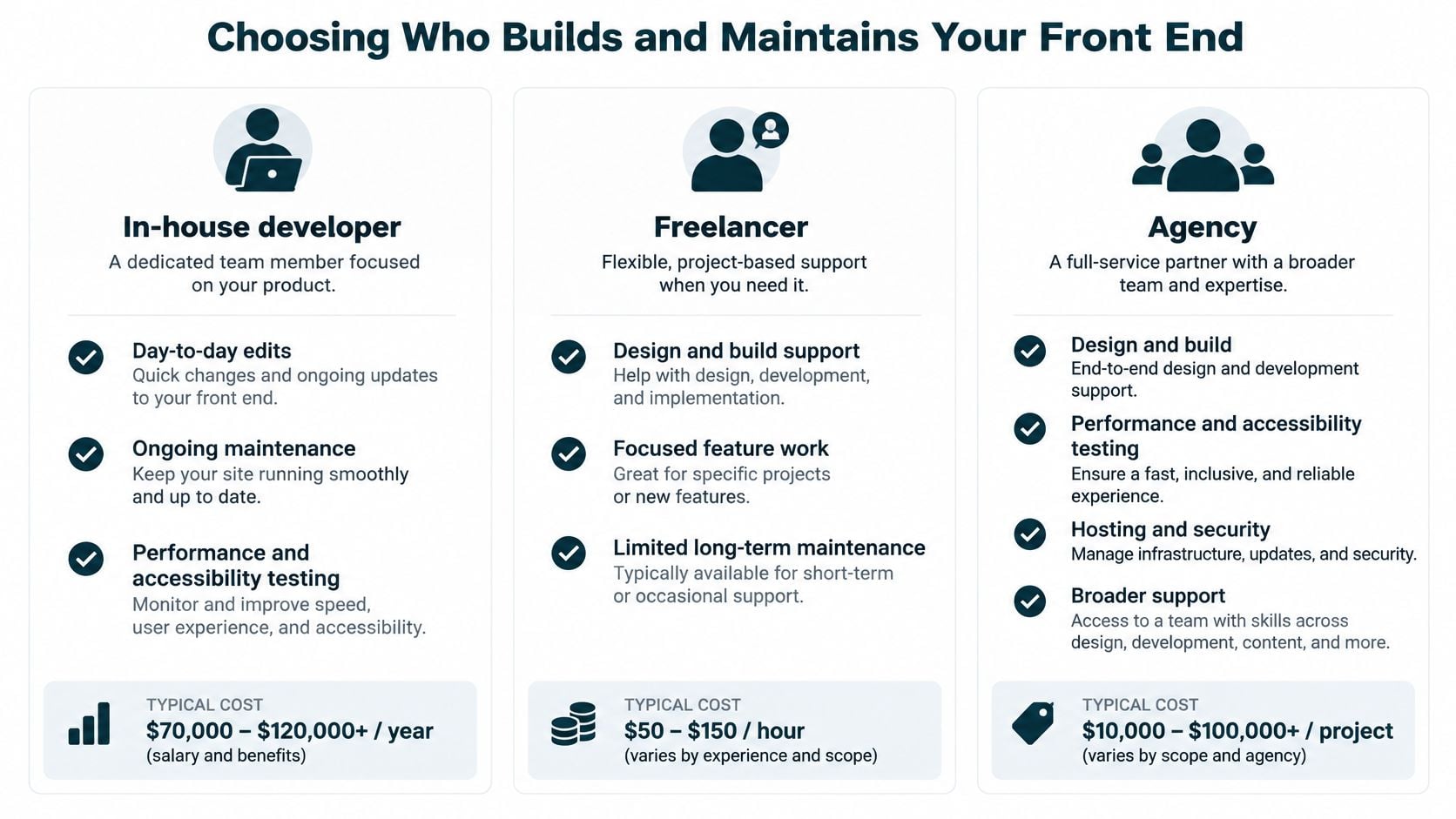
Choose Coverage Before Comparing Quotes
For an employee comparison, Mojolin's web developer salary expectations offer a starting point. Recruiting, tools, benefits, and specialist backup add to the salary figure, so the actual cost of one hire is higher than the number in the offer letter.
I would use these decision signals:
- Rebuild when patching prevents progress: If conflicting plugins and fragile templates make ordinary changes risky, compare a stable rebuild against continued repair. Keep a sound site; replace a site where each fix raises the risk of the next change.
- Keep support attached to critical journeys: A website responsible for leads, sales, donations, or bookings needs a clear response arrangement after launch.
- Name an accountable owner: Give performance and accessibility a named coordinator, even when several people perform the work. Unowned metrics drift until they become someone else's emergency.
Bruce & Eddy offers website rebuilds, custom development, WordPress work, managed hosting and security, and maintenance. Its custom development covers legacy upgrades, new products or platforms, AI-powered integrations, complex multi-site needs, and stable rebuilds after years of patchwork.
The team stays after launch, and if something breaks, it handles the problem itself. A real person contacts customers to talk about the website, whether it already exists or needs to be built from scratch.
Maintenance Matters Most Where Errors Can Return
WebAIM's 2025 Million analysis found an average of 51 detected accessibility errors per home page across the top one million home pages. That counts detected errors, not the full experience of every visitor.
New content, replacement widgets, and template edits introduce fresh problems on sites that were clean at launch. Scanners cannot reliably evaluate every keyboard or screen-reader interaction, so maintenance should include task testing and regression checks on the journeys that produce revenue.
For limited budgets, fix blocked submissions and shared components before polishing isolated pages. A header or form error repeats on every page it touches, which makes it the cheapest place to reduce total risk. Document how editors should handle headings, link text, and images so fixes survive the next content update.
Use our guide to choosing a website developer to evaluate fit, then get clear answers before signing:
- Accessibility ownership: Who owns accessibility after launch?
- Performance measurement: How will visitor experience be measured?
- Breakage response: What happens when something stops working?
- Content responsibility: Who edits content and maintains publishing standards?
- Release testing: How are changes checked before they go live?
Bruce and Eddy offers front-end development, website rebuilds, and ongoing maintenance for businesses that need a dependable site and clear responsibility after launch. Visit Bruce and Eddy to discuss your existing website or a new build, including what needs fixing now and who should maintain it next.
